Many creators have already switched from Adobe Premiere to DaVinci Resolve, and now the developer, Blackmagic Design, is going after Lightroom and Photoshop. The Australian company recently unveiled DaVinci Resolve 21 in beta at the NAB 2026 broadcast conference, with a new page called Photos designed to let you do things like crop and color-correct still images. Additionally, the new version introduces video AI tools that can age a subject or reshape their facial features.
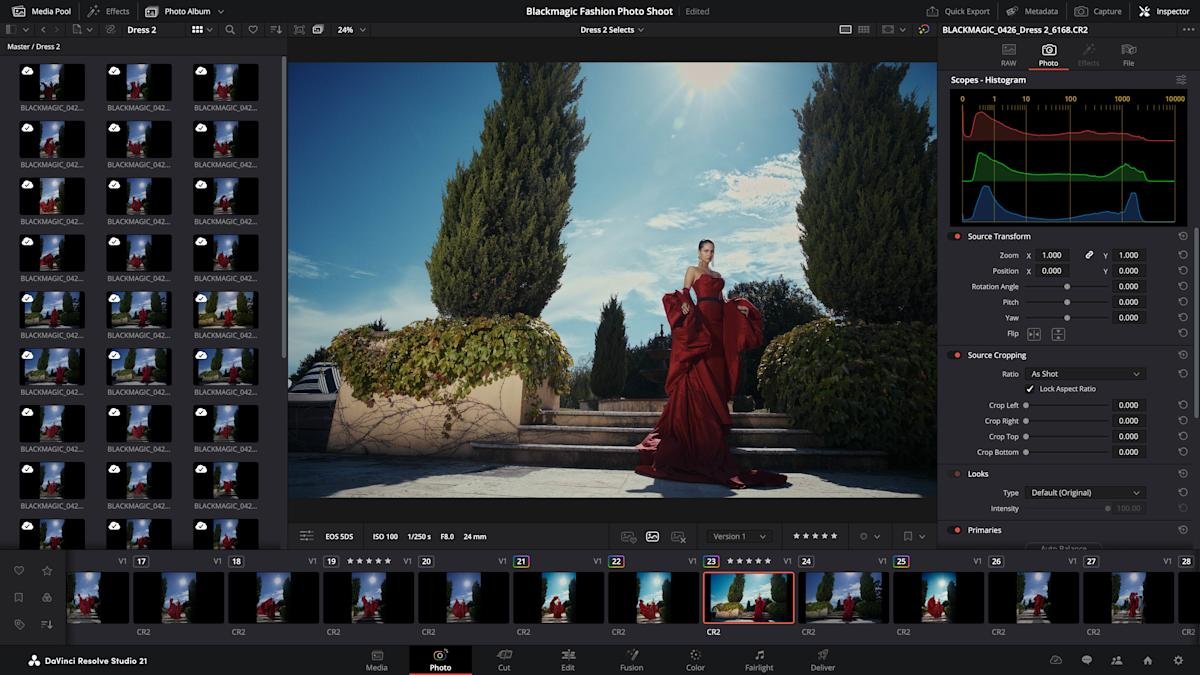
DaVinci Resolve has always let you edit photos as clips on the video timeline, but now it’s made much simpler with the Photos page. You can import and manage photos, including RAW files from Canon, Fujifilm, Nikon and Sony, directly in the new page. Then, you adjust them using the node-based Color Page which offers similar and arguably more powerful tools than Adobe’s Lightroom.
Like video, the Color page includes primary color correction, curves, qualifiers, and power windows (with noise reduction, sharpening, and more). However, Resolve’s node-based workflow really shines for photo editing. You can add nodes in series or parallel to create complex gradients, then save them to apply to other images or an entire photo album. You can also reframe and crop images to their original source resolution and aspect ratio, without affecting the original image quality.
Lightbox view lets you view an entire album with grades applied. “Select any image and grade it live while watching results update across the entire collection in real time. Filter by graded, ungraded, star rating, flag, and clip color,” Blackmagic Design explained in a press release. Albums, meanwhile, let you create collections like Lightroom. They also appear as a timeline in the color, cut, and edit pages for easy access.
For pro photographers, the Color page includes camera controls that let you set resolution to a Sony or Canon camera for live image capture while adjusting settings like ISO, exposure, and white balance. According to Blackmagic, you can save capture presets to “lock in a consistent look before clients shoot.”
Other resolution tools also work with the photo page, like AI Magic Mask that lets you make a one-click selection of an object or person. It’s also possible to perform advanced VFX on still photos using Resolve’s Fusion page or add OpenFX or FusionFX filters directly to the photo page. Finally, you can collaborate with others using the Blackmagic Cloud, although this requires a paid subscription.
I tested the color tool briefly and, as someone who is familiar with Davinci Resolve, I found it easy to understand. It’s easy to import and organize images (even easier than Lightroom in my opinion) and just as powerful as Lightroom’s Develop page for most adjustments, though I really missed the latter’s “Clarity” tool. The node-based workflow is powerful, and Resolve makes it easy to apply adjustments to multiple images. When you’re ready to export, it’s done through a special photo-only version of the “Export” page and it’s relatively intuitive, too. However, it remains to be seen whether I will cancel my Photoshop/Lightroom subscription.
blackmagic design
On top of the photo page, Blackmagic Design also introduced several new tools for video and VFX. Among the most interesting are a series of AI tools for facial adjustments. The AI Face Age Transformer tool lets you analyze a face, enter the subject’s age, and adjust the age offset slider to add things like wrinkles and facial fullness. You can also change the way a subject looks through the AI Face Reshaper tool that lets you adjust the eyes, nose, mouth, eyebrows, and overall face shape. Plus, you get an AI Blemish Removal feature that reduces superficial skin imperfections like acne, discoloration, and large pores while maintaining the skin’s natural texture.
Another tool that will undoubtedly be popular is AI UltraSharpen, which can upscale videos to “make previously unusable footage sharper in higher resolutions,” according to the company. It can also be used to correct minor focus errors. Meanwhile, AI Motion Disabler fixes slightly blurry images, making it especially useful for slow motion and freeze frame shots.
Other major new upgrades, to name a few, include the ability to edit Fusion effects from within the Cut and Edit pages, the addition of the Krokodov library of compositing tools, and new immersive VR tools for delivery on platforms like Meta Quest and YouTube VR. Most of the new features are available in Blackmagic Design’s free version of DaVinci Resolve, although some tools (AI Magic Mask and Film Look Creator) are only available with the paid $295 DaVinci Resolve Studio version. The full list of new features is here and you can download the free and paid versions here.
<a href