We may receive commission on purchases made from links.
Amazon’s Kindle Unlimited (KU) got a price hike in 2023, increasing its subscription fee from $9.99 per month to $11.99. While the book-lending service gives you access to a catalog of over 5 million titles, paying basically $12 a month to do so is miserable, especially in this economy. What’s worse, that spend becomes wasted if you’re too busy maxing out your subscription in the first place. The good news is that there are ways to get Kindle Unlimited for very little money, sometimes half price, or even free.
To clarify, you do not need to get a Kindle Unlimited subscription or pay a monthly fee to continue using your e-reader. You can simply buy books from Amazon or any other marketplace, which you can then send to your device. This service is good for you if you are an avid reader who can read dozens of books every month or want to explore the types of books you would normally avoid spending money on.
Share a single subscription with anyone through Amazon Family
Amazon Family, formerly known as Amazon Household, lets you share Prime benefits and digital content with one other adult and up to four children, as long as they have the same primary residential address. If you live with another adult who also loves to read, you can simply split the cost of one account and pay $6 each. To take advantage of this feature, you need to go to the Amazon Family portal and then select Add Adult to send the invitation to the other person. You have to “share wallet”, which means you both see the last four digits and expiration dates of each other’s payment methods, to basically prove that you live together.
Once this is complete, you can start sharing books. On the Kindle app’s home screen, select “Share your Kindle Content,” and then choose your subscription partner. After that, you can select the books you want to share with them – or they can select the books they want to share with you. Yes, the downside to this method is that only the primary Kindle Unlimited account holder, or one who has signed up for a subscription, can borrow books. Don’t forget that you’ll also both have to split the maximum download limit of 20 titles at a time if you don’t read the same things.
If this isn’t a problem and your interest in literature is similar, you can turn on automatic sharing by selecting “Share future purchases and unlimited titles by default” under “Share your Kindle content” in the app’s home screen. This will automatically send the titles you borrow to your partner’s Kindle. Just keep in mind that if the account owner returns the book, it will also disappear from all family members’ devices when they’re connected to the Internet.
Take advantage of credit card discounts and rewards
Credit card companies sometimes run promos for Kindle Unlimited. They aren’t always available, so you’ll have to check your credit card portal, your monthly statement or your providers’ emails. For example, Chase sometimes sends out offers for a 20 percent discount on service that will knock off $2.40 and bring the fee down to $9.60. Bonus: If you’re sharing your account and splitting the fee evenly, you’ll each pay just $4.80.
Amazon’s own credit cards Prime Visa and Amazon Visa offer small cashback rewards for Kindle Unlimited subscriptions. Every time you renew or pay for KU, you can get 5 percent back (60 cents) with an eligible Prime membership or 3 percent back (36 cents) without it. However, if you apply for the new Prime Visa or Amazon Visa, you’ll get a $200 and $50 Amazon gift card, respectively, that you can use to pay for Kindle Unlimited.
You can also check your credit card’s rewards portal to see if you can redeem points for an Amazon gift card or if you can pay directly with your points. Chase, Amex, Citi, and Capital One all have rewards programs that allow you to pay with points at checkout at Amazon.
 Amazon
Don’t forget to claim your free trial
You can usually get a 30-day free trial of Kindle Unlimited when you sign up, but Amazon sometimes runs promos that give you access to the service for longer than that. As part of Prime Day this June, Amazon is offering three months of membership for free if you’re a new member.
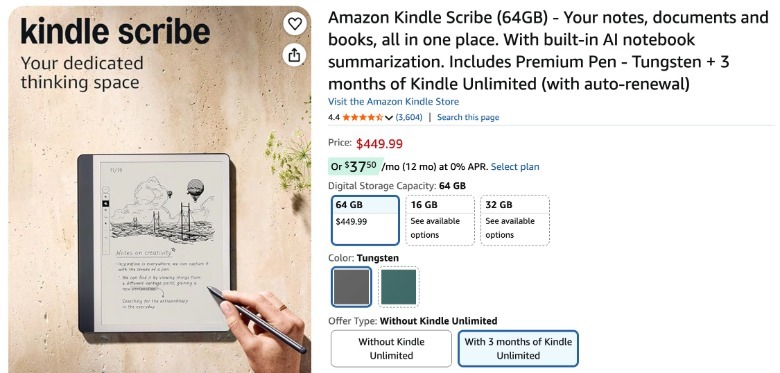
If you recently purchased a new Kindle, whether it’s a Scribe or an older model, check its landing page to see if it comes with a free 3-month Kindle Unlimited subscription. The Kindle doesn’t automatically come with a free subscription, so be sure to scroll down to the “Offer Type” section in the device’s Amazon listing before purchasing and select “With 3 months of Kindle Unlimited.”
Those three months start as soon as you place your order. The good news is that you can start reading KU titles on the Kindle app even before you get your new e-reader. Also keep an eye out for special promotions, as Amazon sometimes bundles new Kindles with four to six months of free KU membership instead of just three.
Track customer rebate returns
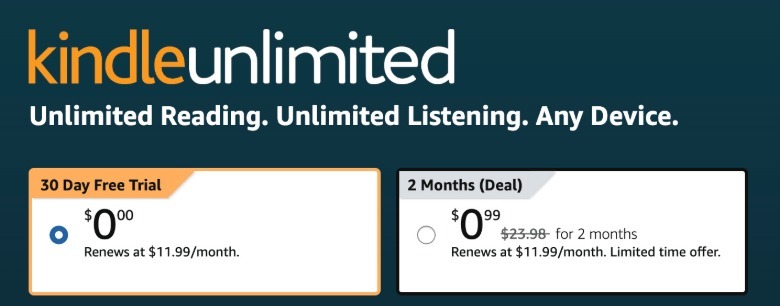
Like any other company, Amazon will try to make you pay for your product if you try to leave. When you try to cancel your subscription, you may get a promotional rate for the service that will be good for the next few months. You may also receive an offer in the next few months for up to 50 percent off to motivate you to sign up again. Be sure to check the Kindle Unlimited portal periodically for potential discounts. My subscription has expired, and I see an offer for a two-month subscription for only 99 cents.
 Amazon
Gift (or receive a gift) a subscription.
Granted, this won’t lower the price of Kindle Unlimited by much, but you’ll still get $1 off per month if you purchase a 12-month gift subscription. You can send these to people you know would love this service, and maybe tell your loved ones that this would make a nice gift for you, perhaps? However you receive the gift, be sure to redeem it using the email entered in your KU account.
Cancel before your subscription expires
This is just a reminder that if you use any of our tips above to get a discounted subscription, don’t forget to cancel your subscription before Amazon bills you $11.99 after your promotional rate ends. Go to Accounts & Lists on the top right corner of the Amazon website and select Kindle Unlimited in the drop-down menu. You can cancel your subscription from there and then look for new deals or wait for the offers to arrive in your inbox.
<a href