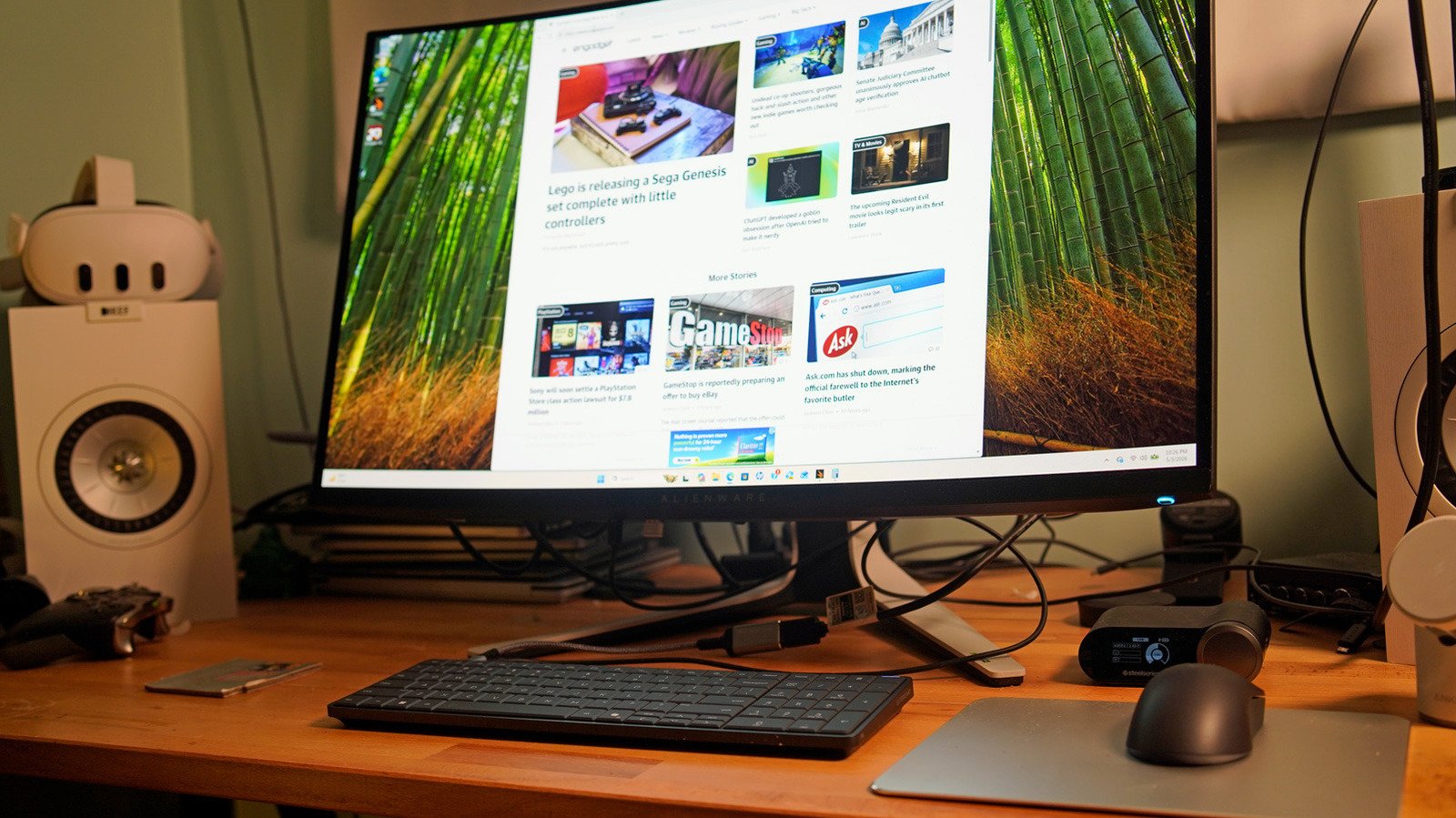
- sleek design
- Functions effectively as a desktop
- Great typing experience
- can use video port
- expensive
- Loud fan noise in quiet rooms
When I tested an early version of HP’s EliteBoard G1a – a keyboard that has all the capabilities of a desktop PC – I was intrigued. Now, after spending time with the final version of the device, I’m convinced that this is a sign that computers will become completely unrecognizable in the next few years. But there’s a reason HP isn’t selling the EliteBoard as a consumer device: In its current form, and with its current $1,499 starting price, it exists primarily to satisfy the curiosity of a bored IT manager. This is not for you. But wouldn’t it be nice if that happened?
Looking at the Eliteboard reminded me of the early days of PCs, when the Commodore 64 was essentially a giant keyboard box that you connected to your TV. For the latest stab at the keyboard PC concept you have to go back to ASUS’s Eee keyboard in 2009, just as the smartphone revolution was just beginning. These days, the abundance of cheap ultraportable laptops and even lightweight tablets on the market makes it hard for mainstream consumers to justify a true keyboard desktop.
But put yourself in the shoes of an IT worker who has to manage dozens of computers in a lab, or possibly hundreds or thousands of computers throughout an organization. In fact, I’m asking you to put yourself in my shoes Twenty years ago, I spent about eight years working in IT while in college. I spent more time than I wanted to carry massive Dell desktops across campus with golf carts and hand trucks. Most of those machines were only lightly used in laboratories and offices. And while there are much more compact desktops out there these days, they certainly can’t beat the 1.5-pound EliteBoard’s weight.
Hardware: A desktop in keyboard attire
The most remarkable thing about HP’s EliteBoard is how simple it looks. In truth, it looks exactly like dozens of other gray and black keyboards you find strapped to corporate machines. Even its weight doesn’t give away its secrets, as many mechanical keyboards are quite heavy. But look a little closer and you’ll see what makes it unique. Its keys have a soft touch cover, which practically invites your fingers to start typing. It also has a generous amount of key travel, providing a responsive typing experience without the hurt of hard plastic that you can feel and hear from cheaper keyboards.
On the back, it only has two USB-C ports. This is where things get a little weird: There’s a 45W port that can power the EliteBoard And Deliver monitor signal to USB-C monitor. Using the first connection with an HDMI adapter, you can also power the system from the second port via its standalone USB-C charger. HP includes an HDMI hub that connects directly to the monitor, giving you ports to connect additional HDMI screens, USB-C charging, and a separate USB-C connection for the EliteBoard.
Under the hood (or keys, as it were), the system features AMD’s Ryzen AI 300 chips, as well as user-replaceable RAM and SSDs. My review unit shipped with a Ryzen AI 5 Pro 340 with Radeon 840M graphics, 32GB of memory, and a modest 512GB SSD, which is the bare minimum I’d expect from a corporate machine. As you’d expect, it also has built-in Wi-Fi and Bluetooth.
HP also includes a wireless mouse with the EliteBoard, which connects to the system right out of the box. It’s perfectly fine for basic work and travel, but I found it a little light and flimsy. I think most people would be better off investing in something like Logitech’s MX Master series for more serious use, as it’s far more ergonomic and responsive.
Setting up EliteBoard G1a
I’ll admit, I was confused by the system’s setup process at first, as I expected to see an HDMI or DisplayPort connection along with its USB-C port. Instead, HP suggests either using its bundled HDMI hub or connecting directly to a USB-C screen. The hub is functional, but its short cable length made it hard to plug into my Alienware monitor. I think the company just wanted something that you could easily hide behind a screen. Connecting to a USB-C monitor is the cleanest option, as only one cable is needed to deliver both video and power signals to the Eliteboard.
My initial strategy of connecting the Eliteboard to a standalone USB-C charger and my own USB-C hub (which has an HDMI port) left my desk looking like a mess of wires. And unfortunately, I couldn’t get HP’s hub to send a video signal to my monitor. So I picked up a $10 HDMI to USB-C adapter and plugged it into the HDMI cable. While the Eliteboard ultimately only required two cables to get to my desk, I couldn’t help but imagine how neat it would look if I had a USB-C monitor.
In addition to being ideal for computer labs and offices, HP also says the EliteBoard is built for workers who move between different locations, such as hot desking spots. However, for that situation, you’ll ideally want a USB-C monitor in every location. Dealing with HP’s HDMI hub would be a pain every time. The system can last for approximately three and a half hours as you move between locations with the optional built-in battery.
Using the EliteBoard G1a: Well, it’s a Windows PC
Once I sorted out the wires, the HP EliteBoard G1a was like any other PC. I booted it up, logged into Windows, configured my fingerprint on its built-in reader (which also covers the power button) and was on the desktop within five minutes. And after that, using it felt just like any other basic Windows system.
Installing apps from the Microsoft Store, browsing the Web, watching YouTube videos, writing articles, and checking email didn’t feel much different from other PCs I’ve seen recently. Its PCMark score of 6,736 puts it on par with ultraportable laptops from two years ago, like HP’s Specter x360 16 and other systems running Intel’s Core Ultra 7 155H chip. However, my review unit’s built-in Radeon GPU had only a small amount of VRAM, leading to warnings whenever I tried to run 3DMark benchmarks. You can probably get most of your office work done with Eliteboard, but don’t plan on wasting some gaming time. (Which honestly makes it even more attractive for businesses.)
HP deserves extra praise for the attention it pays to the keyboard portion of its keyboard PCs. Typing on the Eliteboard felt like a dream, and not once did I feel like the experience was compromised by having a ton of hardware packed into it. Since this is a full-blown PC, you’ll definitely hear its fans whirring occasionally, which can be a problem in libraries and quiet labs. But at least you won’t feel much heat on the keys when you press hard.
I was also surprised to see a small speaker on the Eliteboard, but it’s really only useful for listening to system sounds. If you want any tunes, you’ll have to use Bluetooth speakers or headphones, or connect to computer speakers over USB-C.
Who needs the EliteBoard G1a?
The EliteBoard G1a had one job: to be an effective desktop in the size of a keyboard. And ultimately it succeeded. But I’ll repeat: Unless you’re working in IT, there’s no reason for you to consider buying the EliteBoard G1a, especially at our review unit’s $1,795 price. (Its price starts at $1,500 without battery, 16GB of RAM, and a 256GB SSD.) Like Intel’s Compute Stick before it, the design of the system itself appeals to me, and the fact that it’s a very good PC makes it all the more interesting. But any normal consumer in his right mind would be better off buying a small desktop PC if he wants a clean setup.
Although HP doesn’t plan to make the EliteBoard widely available to consumers, company representatives told me they will pay attention to its reception. If there seems to be a demand for some kind of simplified consumer spin on a keyboard PC, at least HP will have some experience making it.
<a href
Такие состояния требуют профессионального вмешательства, так как без лечения могут усиливаться и приводить к ухудшению самочувствия. При этом помощь может предоставляться анонимно, в соответствии с политикой конфиденциальности данных пациента.
Детальнее – нарколог на дом вывод из запоя
Затяжной запой перестает быть бытовой проблемой в тот момент, когда организм теряет способность самостоятельно восстанавливаться после интоксикации. Накопление ацетальдегида, нарушение водно-электролитного баланса, истощение запасов витаминов и перегрузка сердечно-сосудистой системы создают состояние, при котором домашние методы перестают быть безопасными. Срочно стабилизировать самочувствие и быстро купировать абстинентный синдром позволяет только контролируемая медицинская среда. Вывод из запоя в стационаре в Нижнем Новгороде становится клинически обоснованным решением, когда требуется не просто снятие симптомов, а комплексная детоксикация под круглосуточным наблюдением врачей. Наркологическая клиника «Стармед» организует процесс лечения в соответствии с актуальными стандартами доказательной медицины, обеспечивая безопасность пациента, прозрачность процедур и плавный переход к противорецидивной терапии. Мы понимаем, что решение о госпитализации часто принимается в состоянии стресса, поэтому наша работа начинается с четкой диагностики, честного объяснения плана лечения и соблюдения строгих протоколов конфиденциальности. Опытные специалисты клиники помогут вызвать доверие к процессу восстановления уже на этапе первого контакта.
Получить дополнительные сведения – [url=https://vyvod-iz-zapoya-v-staczionare-nizhnij-novgorod-6.ru/]вывод из запоя в стационаре клиника[/url]
Процедура начинается с осмотра пациента. Врач оценивает основные показатели, включая давление и пульс, а также выраженность симптомов. После этого формируется состав капельницы и определяется тактика лечения, что позволяет эффективно провести вывод из запоя.
Ознакомиться с деталями – капельница от похмелья на дом в воронеже
Вызов капельницы от похмелья с контролем врача в Самаре рекомендуется, когда симптомы похмелья становятся особенно тяжелыми и мешают нормальной жизнедеятельности. Несмотря на то, что многие пытаются справиться с похмельем с помощью домашних методов, такие как прием жидкости или таблеток, они не всегда оказываются достаточно эффективными. В случае сильных симптомов похмелья, капельница с врачебным контролем — это более безопасное и быстрое решение, при этом возможен вывод в стационаре, анонимное лечение и консультации по вопросам наркомании с учетом актуальной цены услуг.
Получить дополнительную информацию – https://kapelnicza-ot-pokhmelya-samara-13.ru/
Процедура проходит под наблюдением квалифицированного врача, что минимизирует риски для здоровья пациента и помогает ускорить процесс восстановления. Важно, что такой подход позволяет избежать госпитализации, что для многих пациентов является дополнительным комфортом.
Выяснить больше – нарколог на дом вывод из запоя в екатеринбурге