Multiview features on Apple TV 4K work the same for all games. However, because MLB Baseball is much more limited in the number of games/streams available, the method of access is a little different. Normally, you must select the one stream you want in the grouping and multiview options will appear in the playback controls or in-stream menu. Selecting them will give you the ability to create your own multiview from the menu of currently available games and shows. Once again, you’ll be able to watch up to four streams simultaneously – except for baseball.
When you’re watching an MLB game, a multiview icon will appear on the player controls next to the options for subtitles, alternate audio feed, and picture-in-picture (PIP). Since Apple TV only airs a maximum of two MLB games at a time, there will only be three options for creating a multiview feed: two games and Apple’s mlb big innings Studio show.
MLS fans have the ability to watch up to four games in Multiview, or up to three games and Apple TV mls 360 Whiparound Show. The studio show offers a live look at the games in progress, real-time analysis and ongoing discussions on the day’s events. To set up your MLS multiview, start by watching any match. You’ll see a multiview icon in the playback controls where you can browse available live games and shows.
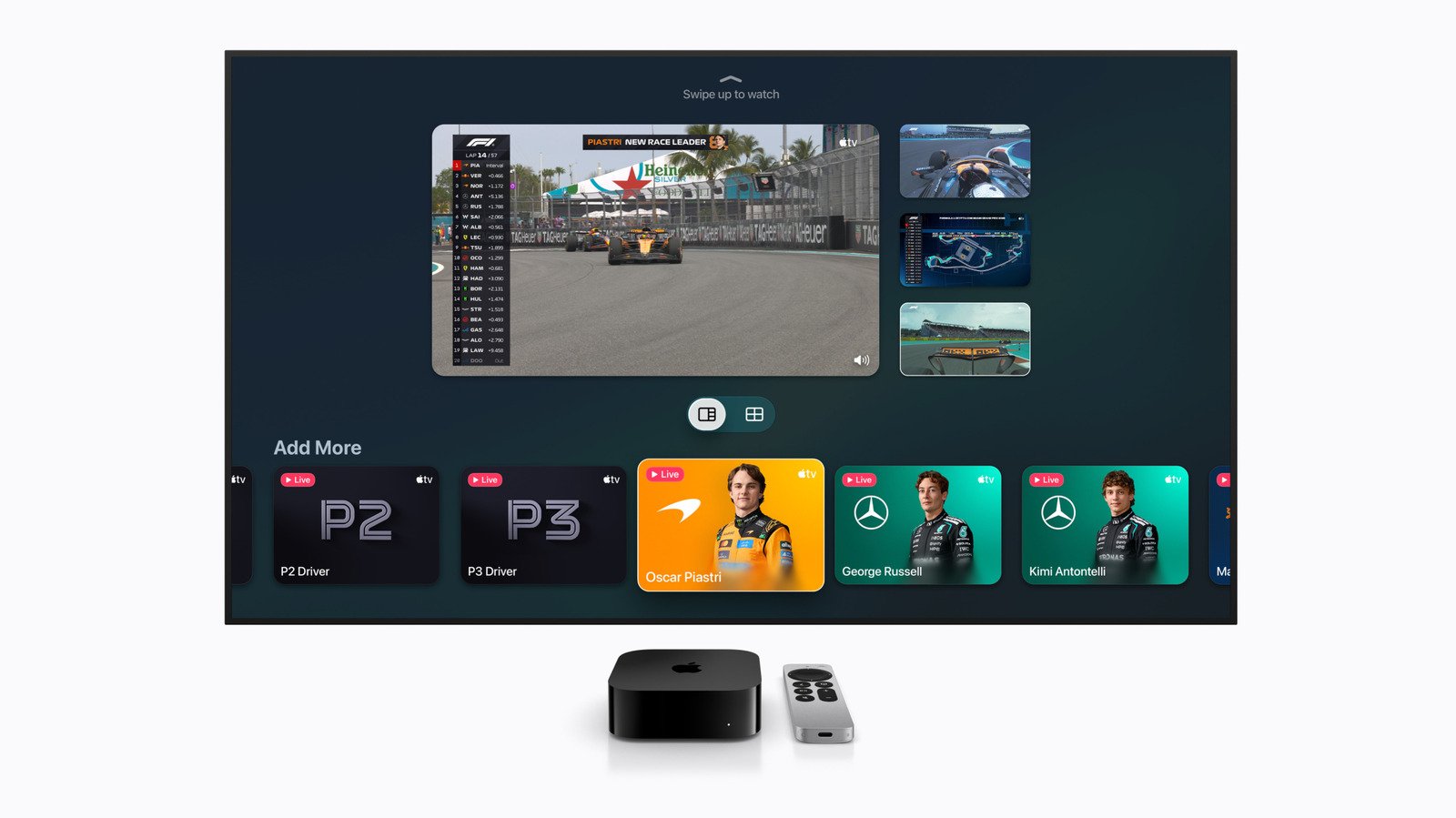
Formula 1 may be the most recent addition to the Apple TV Sports lineup, but the racing series also has the most unique multiview options. Since Apple has partnered with F1, Apple TV subscribers get an F1 TV Premium subscription for this season. However, many of the things included in that access are available in the Apple TV app – including multiview selections. Once you’ve selected your main feed, the Multiview option appears in the in-stream menu just below the main playback view. You can display this by swiping down on the Apple TV 4K remote.
In addition to the main race feed, you can create a multiview with a driver tracker, telemetry charts (live timing) and dedicated cameras for P1, P2 and P3. You can also choose from driver onboard cameras for each car. The Apple TV app offers some pre-built Multiview recipes, but you have the ability to create a completely custom setup as you desire. Finally, if you prefer that coverage compared to the F1 TV crew used by Apple TV’s main broadcast, Apple gives race fans the option of a Sky Sports feed with its own commentary team.
For all three sports, you can choose to highlight each stream in multiview by swiping from one box to the next. Doing so will pipe out the audio from that stream, although video from the other stream will always be visible as long as Multiview is active. If you want to view one of the feeds by itself in your multiview, simply click to select it.
In addition to multiview, Apple TV also supports 4K picture-in-picture (PiP). This allows you to keep a game or race small in the corner of your screen while you browse other apps and menus on the streaming box. The PiP option is also available in the playback controls after you select a game, race or show. And unlike MultiView, this feature works with anything you’re watching — even workouts in a fitness app.
<a href