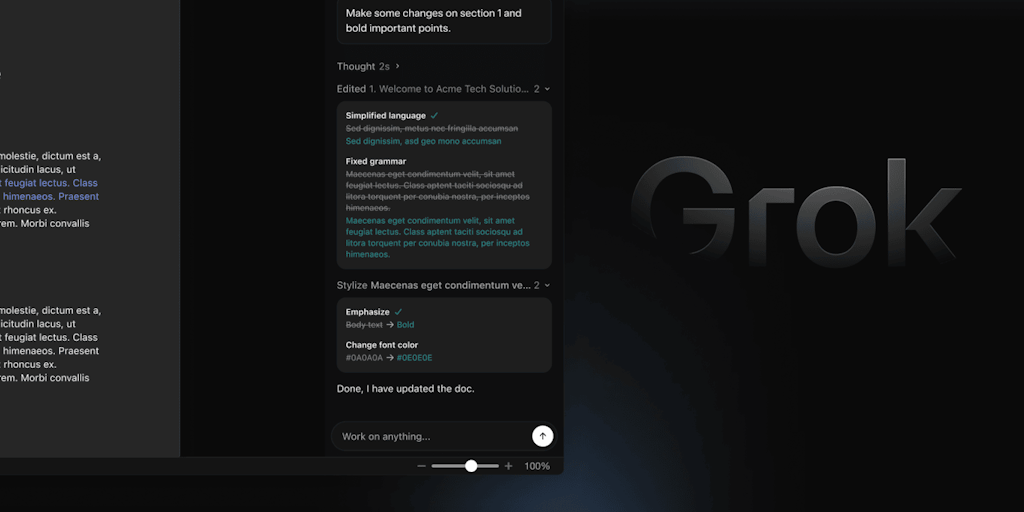
Documents often become inconsistent when edited by multiple people, and rough notes or messy drafts require restructuring. Grok solves this by structuring rough notes, fixing grammar, tightening up phrasing, and normalizing title styles – everything remains in place, everything editable and undoable.
Instead of a separate tab or tool that you copy back into, Grok works in a docked panel next to your document, reads whatever you point it at, and applies edits directly to the file, with a before-and-after comparison for every change.
key features:
- Structure rough notes into formatted Word headings and lists
-
Inline editing: fix grammar, simplify language, tighten phrases
-
Before and after view for each change
-
Normalize heading case and align words throughout the file
-
Editable, visible modifications that you can keep or undo one by one
-
Free to connect to Microsoft Marketplace; Admins can deploy to the entire organization
benefits:
-
Fast formatting and reorganizing without leaving Word
-
Consistent, professional documents across teams
-
No merging copies – edits come straight to your file
-
Everything remains editable and completely undoable
Who is it for and use cases:
-
Writers, editors, and business professionals who use Word
-
Teams collaborating on reports, proposals, and documents
-
Anyone needing to prepare rough notes or maintain a consistent style
Try Grok for Word for free from the Microsoft Marketplace!
PS I’m looking for the latest and greatest launches in tech, SaaS and AI, follow to stay informed → @rohan recommends
<a href