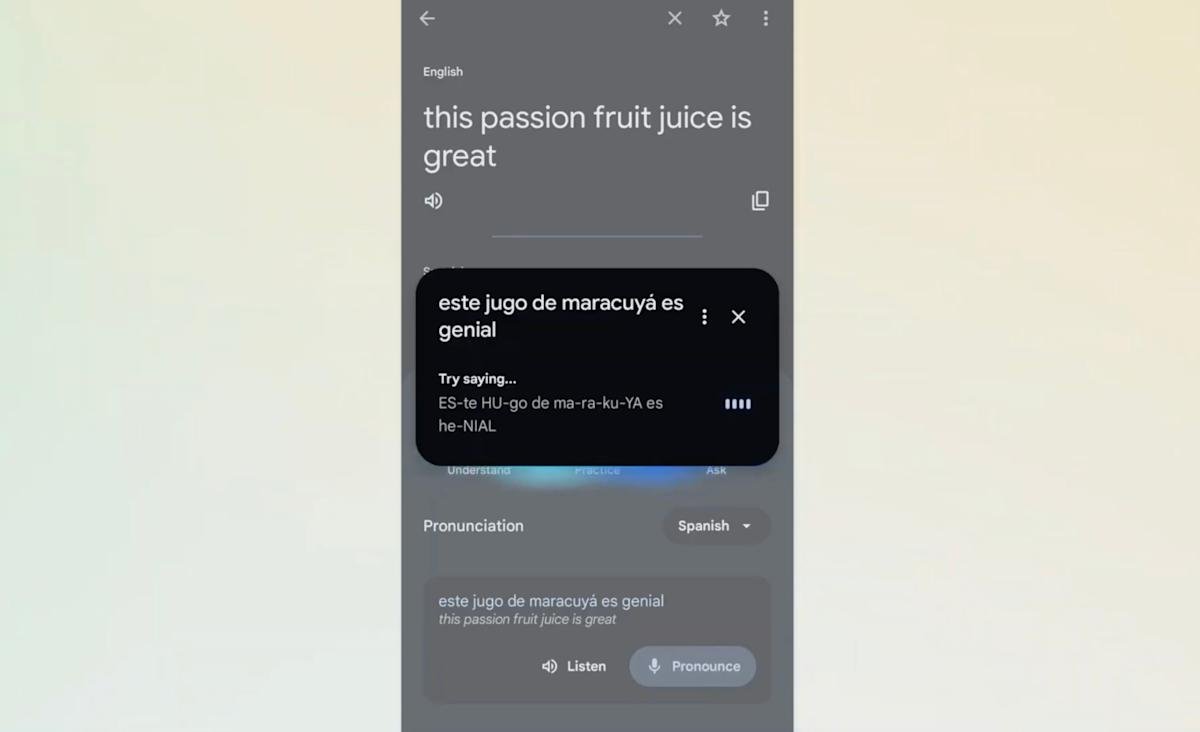
Google is celebrating Translate’s 20th birthday by introducing pronunciation exercises, which the company says is one of the most requested features for the product. The feature is currently available on Android only in the US and India for English, Spanish, and Hindi. If it’s available to you, you’ll see a button at the bottom of the app that says “Practice,” giving you the option to either “pronounce” what you’ve translated or “hear” how native speakers actually pronounce it.
If you choose the “Pronunciation” option, Translate will listen to you and then use artificial intelligence to analyze how you said the words to provide example feedback. It will then show you the phonetic spelling of how specific words should be pronounced. For example, in the example provided by Google, the speaker pronounced the Spanish word for juice as “jugo” with the English “j” sound instead of the Spanish “j” sound. That’s why Translate pronounces it “HU-go” in its pronunciation suggestions.
Google said that about a third of users on mobile use Translate to practice speaking and listening to be able to interact in the real world, making this new feature very useful. The company also revealed other statistics about the app. Apparently, it now supports over 250 languages, including some endangered and indigenous ones, and has over 1 billion monthly users who are translating over 1 trillion words every month.
<a href