When we started building sandboxes for AI agents at Helix, we wanted to give each agent their own desktop environment that we could interactively stream to users’ browsers. Not just static screenshots – full interactive desktops where agents can browse the web, write code and use tools in collaboration with their human colleagues. We looked at VNC, RDP, and various browser-based solutions, but kept coming back to Moonlight.
Moonlight is a game streaming protocol originally designed to stream PC games to your couch. It’s fast, efficient and works beautifully on sketchy network connections. There was just one problem: it was built for single-player gaming, and we needed multi-user agent access.
This is the story of how we bent gaming protocols to our will, and why we’re still dealing with the consequences.
Most AI coding assistants live in your IDE or terminal. But what if your agent actually needs to look at the screen, click buttons, navigate the UI? What if you want to see your agent working in real-time, or collaborate with it in a proper IDE? And what if you want your agent to be able to run on the server while doing all this, so that it can benefit from a good network connection when you open and close your laptop in a café, on the train, even at the beach?
That’s what we’re building with Helix Code. We run full Linux desktop environments in containers, each with a GPU attached. Inside every desktop runs an AI agent that has access to development tools – the cloud, code editors, browsers, terminals. Users connect to see and interact with these agents as they work. And also get a 30,000-foot view of their fleet of agents, because we’re all going to be managers of coding agents, whether we like it or not.
Challenge: How do you efficiently stream these GPU-accelerated desktops to browsers and native clients with low latency across a variety of network conditions?
The Moonlight protocol was originally created by NVIDIA for their GameStream technology. It is designed to stream high-framerate, low-latency video from a gaming PC to another device. Think about playing Cyberpunk on your iPad from the top of your gaming rig.
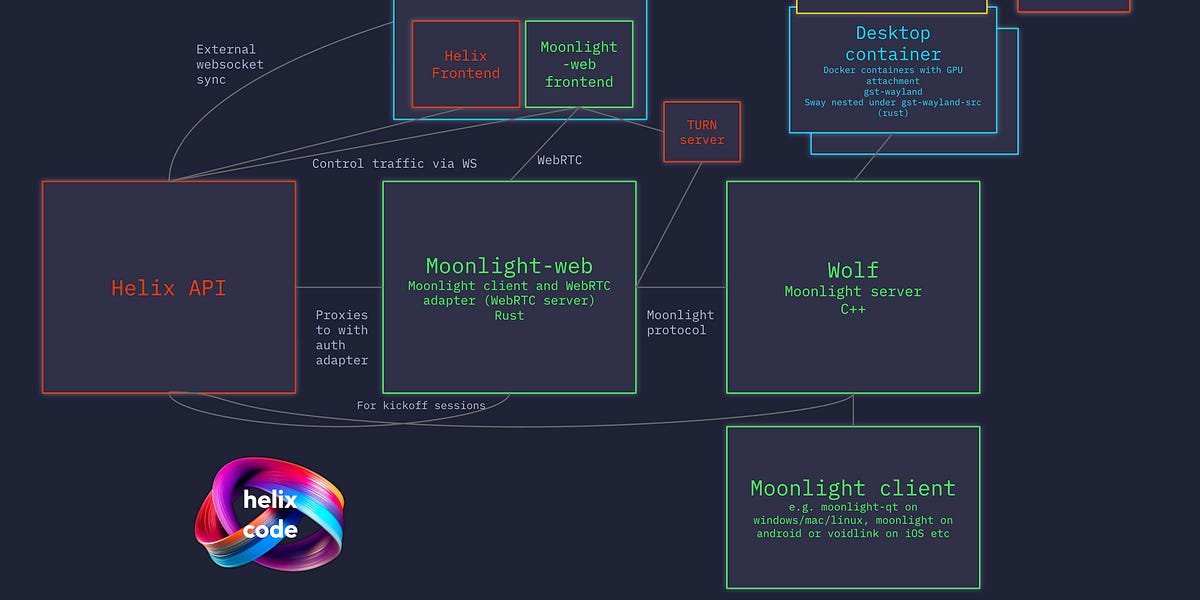
we use wolfC++ implementation of Moonlight Server that runs in containers. Wolf exposes the Moonlight protocol, and clients can connect using Moonlight-Web in a browser or the native Moonlight client on Mac, Windows, Linux, Android, iOS.
The setup is beautiful: Wolf manages Docker containers with GPU attachments, Moonlight handles video streaming, and we get hardware-accelerated desktop streaming working smoothly over 4G.
There’s just one catch.
Moonlight was designed around a simple mental model: one user, streaming one game at a time. You connect, you launch Steam, you play. You can disconnect and reconnect, and your game will still be running. But each customer gets his own instance.
Here’s where it breaks down for us:
hope for moonlight:Each client connects to start their own private game session
is needed: Multiple users connecting to the same shared agent session
In the world of Moonlight, if two clients try to start Steam, they each get separate Steam instances. This is great for gaming – you don’t want your roommate’s controller inputs affecting your game.
But for us, if two people connect to the same AI agent, we don’t want two different agent instances. We want them to both see the same agent performing the same task and potentially interacting with it. The agent has identity and state – it’s logged into services, it has files open, it’s in the middle of tasks.
The semantics don’t match at all.
In “apps mode” (standard Moonlight protocol), Wolf creates an on-demand container when the first client connects. This presents another problem: when does the agent actually start?
We want agents to start automatically when users drag tasks to the Kanban board, or when the system starts autonomous work. We can’t wait for someone’s browser to connect before running the agent.
Our solution was a bit of a hack: the Helix API pretends to be a Moonlight client.
When Helix starts a new agent session, it makes a WebSocket connection to moonlight-web, pretending to be a browser. This starts a “kickoff session” that starts the container and establishes fixed video parameters (4K, 60fps). Then it disconnects immediately.
Now the agent is running, the desktop is up, and end users can connect to it.
But we still have the multi-client issue. If someone connects to an external Moonlight client and starts an agent, they get a completely separate container from the one running in the browser. You end up with multiple “Z” IDE instances, all thinking they’re the same agent, all trying to stream back, walking on each other’s toes.
Apps mode is stable, but it’s basically single-user.
Wolf recently added “Lobbies Mode” – a feature explicitly designed for multiplayer gaming scenarios. Split-screen gaming, multiple controllers, shared screen.
This is what we need.
In lobby mode:
-
You start a lobby through the Wolf API
-
The container starts immediately (no need for our Kickoff hack)
-
Multiple customers can connect to the same lobby
-
everyone sees the same screen
-
Screen resolution is pre-configured, not determined by the first connecting client
We are currently shifting to lobby mode. This solves our fundamental architectural problems:
-
Multiple users can connect to the same agent
-
Agents get started with no customer connection required
-
Browser and native client can connect to the same session
-
We can remove all the Kickoff Session complexity
Lobby mode is still being stabilized. A few weeks ago it had memory leaks and stability issues. The Wolf maintainers have done a heroic job getting this ready for production, but we’re still ironing out bugs:
input scaling is broken: When you connect to a different screen resolution than the one configured for the lobby, Wolf rescales the video correctly, but coordinates the mouse scale incorrectly. Click where you see the button, don’t press anywhere else completely.
Video corruption on some clients: Sometimes the video stream gets corrupted when connecting to a Mac. Still debugging.
resolution flexibility: In Apps mode, each client can negotiate its own optimal resolution. In lobby mode, we pre-configure the resolution when creating the agent. We let users choose (including “iPhone 15 vertical” because streaming to the phone would be nice), but it’s less dynamic.
We’re running apps mode for development right now as it’s stable despite its limitations. But lobby mode is the future.
Here is the architecture:

Helix API: Manages agent sessions, talks to Wolf to create/destroy containers
moonlight trap: WebRTC adapter that connects browser clients to the Moonlight protocol
wolf: Moonlight Server, running in Kubernetes, manages containers attached to GPUs
desktop container:sway (Wayland Compositor) running on gst-wayland-src with full desktop environment
external customers: Native Moonlight client on Mac/Windows/Linux/iOS/Android
The video stream uses WebRTC from the browser to moonlight-web, then uses the Moonlight protocol from there to Wolf. Control signals (connection and encryption setup) flow through WebSockets. Wolf handles GPU encoding and video encoding. The desktop runs actual GUI applications in GPU-accelerated Wayland, not VNC or RDP forwarding.
You can see an AI agent browsing the web, writing code in a real IDE, running commands in a real terminal, streamed to your browser with gaming-grade latency.
Streaming protocols matter a lot when you’re building visual AI agents. Latency, video quality and network resiliency all impact the user experience. Moonlight gives us:
-
low latency:usually 50-100 ms, works on 4G
-
hardware encoding: GPU-accelerated H.264/H.265
-
network flexibility:Designed for incredible wireless
-
multi platform: Works everywhere without custom apps
-
mature protocol:Battle-tested by millions of gamers
But we had to work within constraints designed for different semantics. Gaming protocols assume private, single-user sessions. AI agents need shared, multi-user sessions. Impedance mismatch creates real engineering challenges.
Protocol assumptions run deep: Even when a protocol is technically capable of what you need, the assumptions inherent in the design may still bother you. Moonlight’s one-app-per-client model is fundamental.
Workaround compounds the complexity:Our Kickoff Session hack worked, but added a whole layer of complexity. Sometimes you need to wait for the right feature (lobby) instead of building around the limitations.
Multiplayer gaming has solved it:The gaming community has already found a solution to shared-screen streaming. We just need to find the right mode and wait for it to stabilize.
open source saves the day:Wolf’s maintainer added lobby mode based on actual user needs (ours included). We love open source infrastructure because of being able to work directly with developers and contribute.
We are actively shifting into lobby mode. Once we fix the input scaling and video corruption bugs, we will have proper multi-user agent support. At that time, you will be able to:
-
Connect with original Moonlight customers to see the agents’ work
-
Multiple people viewing the same agent session
-
Remove all Kickoff session complexity from our codebase
-
Appropriately support mobile clients with pre-configured resolutions
If you’re building anything related to desktop streaming, especially for non-gaming use cases, check out wolfAnd if you’re curious about Helix Code or want to try AI Agent desktop streaming, join our private beta via our Discord,
Oh, and here’s proof that it can stream 4K video better than RDP or VNC!