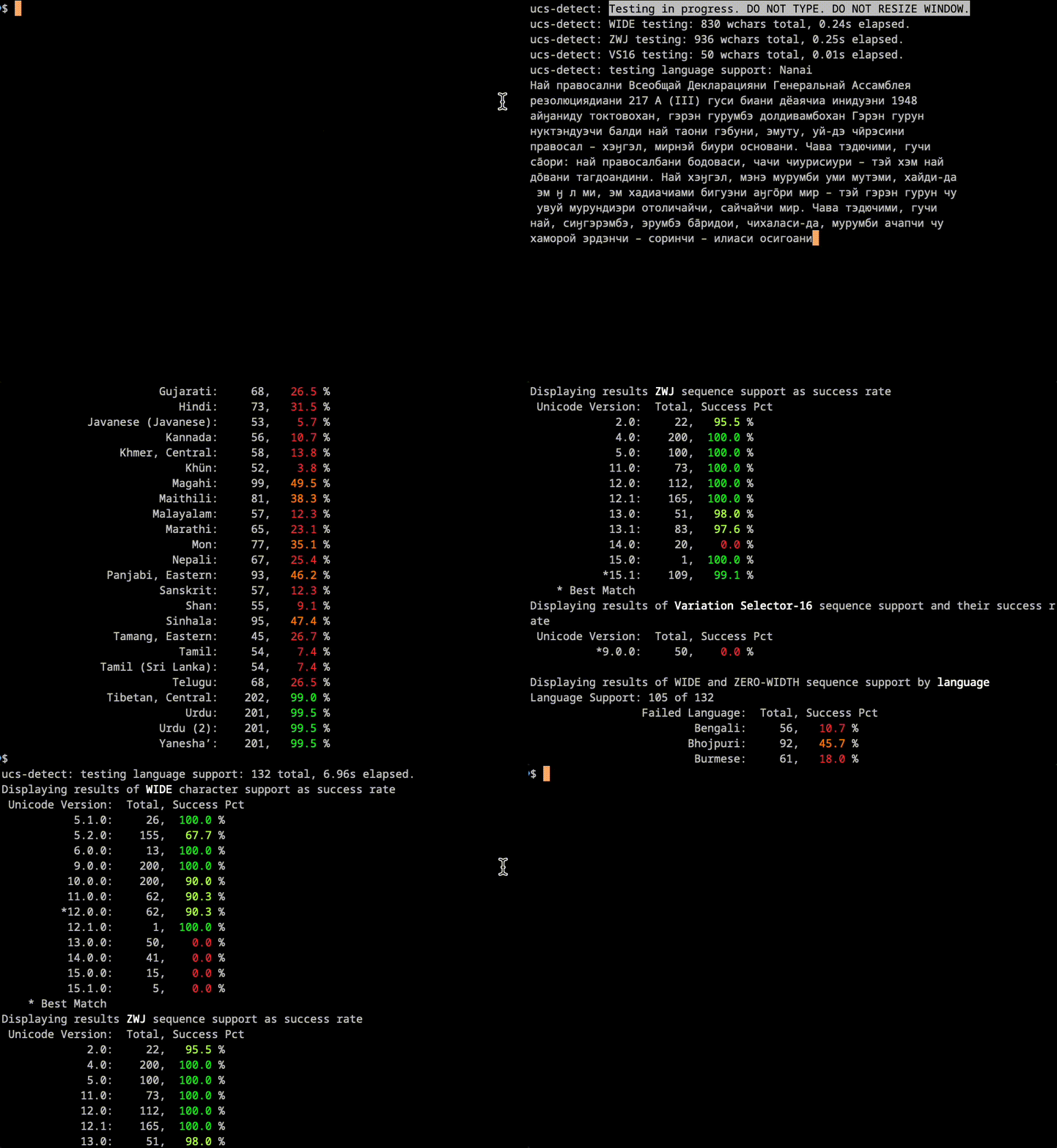
without any argument,
ucs-detect Automatically tests the Unicode version and support level of the terminal emulator for wide characters, Emoji Zero Width Joiner (ZWJ) sequences, Emoji Variation Selector-16 (VS-16) sequences, and combinations of characters by zero-width or supported language. A brief report is then printed to stdout.

installation and use
To install or upgrade:
$ pip install -U ucs-detect
To use:
To run detailed tests and store the yaml report to disk:
$ ucs-detect --save-yaml=data/my-terminal.yaml --limit-codepoints=5000 --limit-words=5000 --limit-errors=500
test results
More than twenty modern terminals for Windows, Linux and Mac were tested, their results are collected in this repository and a detailed summary is published at the URL https://ucs-detect.readthedocs.io/results.html.
An article describing the development of UCS-Detect and summarizing the results of the 1.0.4 release of UCS-Detect in November 2023 has been published at https://www.jeffquast.com/post/ucs-detect-test-results/.
A follow-up November 2025 article discussing the results of the second round of testing, including DEC Private Mode support, for the release of UCS-Detect 1.0.8 has been published at https://www.jeffquast.com/post/state-of-terminal-emulation-2025/.
Individual yaml data file reports for these terminals can also be inspected in the repository folder datahttps://github.com/jquast/ucs-detect/tree/master/data
Please note that the results will be shared with terminal emulator projects and that this information may become outdated as they improve their support for Unicode. Please do not expect the maintainers of UCS-Detect to update these data files. If you would like this report to be corrected for any terminal, please feel free to submit a pull request with updates to the yaml data files.
crisis
Many East Asian languages have wide (W) or fullwidth (F) characters, meaning that each character occupies 2 cells instead of 1. In addition, many languages have special combining characters that are “zero width”, meaning that they do not occupy any cell, merely modifying the previous one as a “combining” character. Finally, there are “Zero Width Joiner” and “Variation Selector-16” characters that are used in sequence for emoji characters.
A terminal application that displays these characters may have trouble determining how it will be displayed to the end-user. This problem occurs frequently, because the Unicode Consortium releases new versions of the Unicode standard from time to time, but the source codes of libraries and applications are not updated at the same time or at all!
Finally, a terminal emulator can have different levels of support. For example, at the time of this writing, Microsoft’s Terminal.exe supports up to Unicode 15.0 for wide characters, is missing support for Unicode 13.0’s 27 characters, has no support for the emoji ZWJ, fully supports all VS-16 sequences, but fails to correctly classify many zero-widths for the world’s 88 or more languages.
Solution
The most important factor is to determine whether the terminal emulator complies with the specification published by the Python WCWIDTH library.
This program, ucs-detectis able to automatically detect The version of Unicode and feature level support that Connecting Terminal supports for the WIDE, ZERO, ZWJ, and VS-16 characters.
how it works
The solution in this program is to use the query cursor position terminal sequence, which asks, “Where is the cursor?”This is a hidden sequence to which the terminal emulator automatically reacts,
Using this sequence and the WCWIDTH library’s data tables, we can test for compliance with the Python WCWIDTH library specification.
The use of query cursor position is inspired by the size(1) program distributed with X11, which determines terminal size on transports that are not able to communicate by signal or forward by environment value, such as over a serial line. resize(1) Just goes to (999, 999) and then asks, “Where is my cursor?” And the response is understood as the terminal shape.
Result is being updated
Use re-run.py Script to update the results of a new version of a previously tracked terminal, for example:
$ python re-run.py data/contour.yaml
it will re-execute ucs-detect With the test with the same parameters as the previous test. The new results will overwrite the existing ones.
Or, to submit results for a new terminal not already tracked:
$ ucs-detect --save-yaml=data/jeffs-own-terminal.yaml --limit-codepoints=5000 --limit-words=5000 --limit-errors=1000
Conditionally you can reduce the test size for slow terminals such as terminals using libvte that require more than 5 hours to complete.
Create a pull draft pull request to this repository with your changes and a github commit status should be reported by readthedocs.org, and, upon clicking “Details”, an HTML preview should appear.
problem analysis
Use CLI arguments, --stop-at-error= Investigating anomalies interactively when detected. For example:
$ ucs-detect --stop-at-error 'Hindi'
When an error occurs it presents the output Hindi Language Test:
ucs-detect: testing language support: Hindi
मानव

Failure in language 'Hindi':
+----------------------------+
|            मानव             |
+----------------------------+

measured by terminal: 4
measured by wcwidth:  3

printf '\xe0\xa4\xae\xe0\xa4\xbe\xe0\xa4\xa8\xe0\xa4\xb5\n'
from blessed import Terminal
term = Terminal()
y1, x1 = term.get_location(); print('मानव', end='', flush=True); y2, x2 = term.get_location()
assert x2 - x1 == 3
The Universal Declaration of Human Rights (UDHR) dataset contains translations into over 500 languages, providing a practical multilingual test corpus for evaluating terminal emulator support of zero-width characters (category MN – nonspacing mark), combinations of characters (category MAC – spacing mark), and language-specific scripts. 532 UDHR text files ucs_detect/udhr/ Sourced from https://github.com/eric-muller/udhr/
Although there is no complete test suite of all zero-width and character combinations in all possible Unicode codepoints, UDHR provides practical coverage of most of the world’s languages. By exhaustive interactive testing of this dataset (testing hundreds of languages with real-world text), the quality of the language test results serves as a suitable indicator of the quality of the terminal’s support for combining digits in different scripts, complex grapheme clusters, and script-specific rendering requirements.