If your organization uses Microsoft Exchange-based email, you’ll be happy to hear that the latest monthly release of Thunderbird is version 145, Now officially supports native access via the Exchange Web Services (EWS) protocol. With EWS now built directly into Thunderbird, third-party add-ons for email functionality are no longer needed. Calendar and address book support for Exchange accounts remains on the roadmap, but email integration is here and ready to use!
What changes for Thunderbird users
Until now, Thunderbird users in Exchange-hosted environments often relied on the IMAP/POP protocol or third-party extensions. With full native Exchange support for email, Thunderbird now works more seamlessly in the Exchange environment, including full folder listing, message synchronization, folder management both locally and on the server, attachment handling, and more. This makes life simpler for users who rely on Exchange for email but prefer Thunderbird as their client.
how to get started
For many people switching from Outlook to Thunderbird, the most common setup involves a Microsoft-hosted Exchange account such as Microsoft 365 or Office 365. Thunderbird now uses Microsoft’s standard sign-in process (OAuth2) and automatically detects your account settings, so you can start using your email right away without any additional setup.
If this applies to you, setup is straightforward:
- Create a new account in Thunderbird 145 or newer,
- In the New Account hub, select exchange (Or Exchange Web Services in legacy setup).
- Let Thunderbird handle the rest!
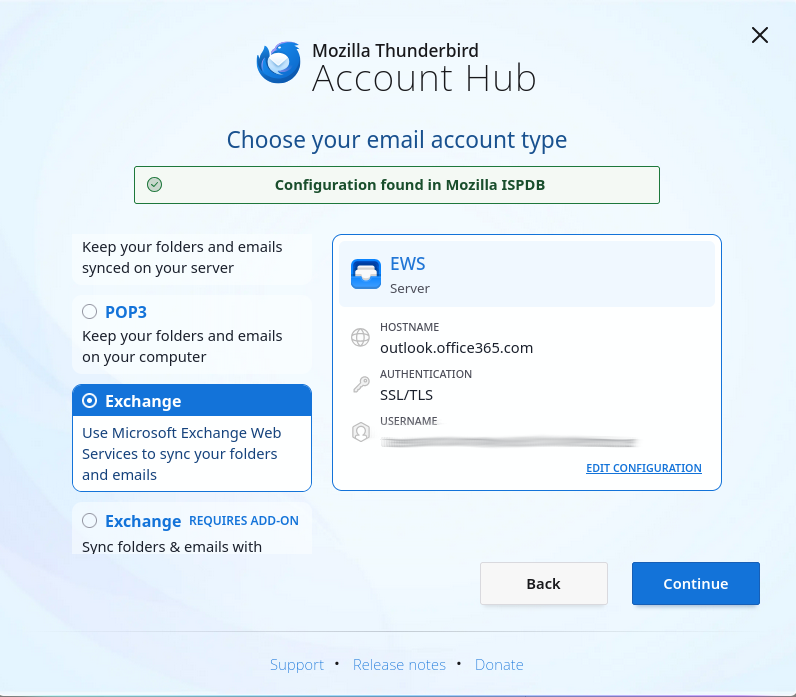
Important Note: If you see something different, or need more details or advice, please see our support page and wiki page. Additionally, some authentication configurations are not yet supported and you may need to wait for any further updates that expand compatibility, please see the table below for more details.
What functionality is supported now and what is coming soon
As mentioned earlier, EWS support in version 145 currently only enables email functionality. Calendar and address book integration is in active development and will be added in a future release. The chart below provides an at-a-glance view of what’s supported today.
| feature area | now supported | not supported yet |
| Email – Account Setup and Folder Access | ✅ Creating accounts via EWS, auto-configuration with server-side folder manipulation | , |
| Email-messaging operations | ✅ View, send, reply/forward, move/copy/delete messages | , |
| email attachment | ✅ Attachments can be saved and displayed with detach/delete support. | , |
| Search and Filter | ✅ Search topic and body, quick filtering | ❌ Filter actions requiring the entire body content are not supported yet. |
| Accounts hosted on Microsoft 365 | ✅ Domains using the standard Microsoft OAuth2 endpoint | ❌ Custom OAuth2 applications and domains requiring tenant IDs will be supported in the future. |
| Accounts hosted on-premises | ✅ Password-based basic authentication | ❌ Password-based NTLM authentication and OAuth2 are on the roadmap for on-premise servers. |
| calendar support | , | ❌ Not implemented yet – Calendar syncing is on the roadmap. |
| Address Book/Contacts Support | , | ❌ Not implemented yet – Address Book support is on the roadmap. |
| Microsoft Graph support | , | ❌ Not implemented yet – Microsoft Graph integration will be added in the future. |
Exchange Web Services and Microsoft Graph
While many people and organizations still rely on Exchange Web Services (EWS), Microsoft has begun to slowly phase it out in favor of a new, more modern interface called Microsoft Graph. Microsoft has stated that EWS will continue to be supported for the foreseeable future, but over time, Microsoft Graph will become the primary way to connect to Microsoft 365 services.
Since EWS is still widely used today, we wanted to ensure full support for it first to ensure compatibility for existing users. Additionally, we are actively working to add support for Microsoft Graph, so Thunderbird will be ready with the changes to Microsoft’s new standard.
looking ahead
While Exchange email is available now, calendar and address book integration is on the way, bringing Thunderbird closer to a complete solution for Exchange users. For many people, having reliable email access is the most important step, but if you rely on calendar and contact synchronization, we’re working hard to bring this to Thunderbird in the near future, making Thunderbird a strong alternative to Outlook.
Keep an eye on future releases for additional support and integration, but in the meantime, enjoy a seamless Exchange email experience within your favorite email client!
If you would like to learn more about Exchange support in Thunderbird, please visit the dedicated page at support.mozilla.org. Organization administrators can also find more information on the Mozilla Wiki page. To keep track of ongoing and future work in this area, please see the relevant meta-bug on Bugzilla.