

I imagine that most people who take an interest in de-Googling are
concerned about privacy. Privacy on the Internet is a somewhat nebulous
concept, but one aspect of privacy is surely the prevention of your web
browsing behaviour being propagated from one organization to another. I
don’t want my medical insurers to know, for example, that I’ve been
researching coronary artery disease. And even though my personal safety
and liberty probably aren’t at stake, I don’t want to give any support
to the global advertising behemoth, by allowing advertisers access to
better information about me.
Unfortunately, while distancing yourself from Google and its services
might be a necessary first step in protecting your privacy, it’s far
from the last. There’s more to do, and it’s getting harder to do it,
because of browser fingerprinting.
How we got here
Until about five years ago, our main concern surrounding browser
privacy was probably the use of third-party tracking cookies. The
original intent behind cookies was that they would allow a web browser
and a web server to engage in a conversation over a period of time. The
HTTP protocol that web servers use is stateless; that is, each
interaction between browser and server is expected to be complete in
itself. Having the browser and the server exchange a cookie (which could
just be a random number) in each interaction allowed the server to
associate each browser with an ongoing conversation. This was, and is, a
legitimate use of cookies, one that is necessary for almost all
interactive web-based services. If the cookie is short-lived, and only
applies to a single conversation with a single web server, it’s not a
privacy concern.
Unfortunately, web browsers for a long time lacked the ability to
distinguish between privacy-sparing and privacy-breaking uses of
cookies. If many different websites issue pages that contain links to
the same server – usually some kind of advertising service – then the
browser would send cookies to that server, thinking it was being
helpful. This behaviour effectively linked web-based services together,
allowing them to share information about their users. The process is a
bit more complicated than I’m making it out to be, but these third-party
cookies were of such concern that, in Europe at least, legislation was
enacted to force websites to disclose that they were using them.
Browsers eventually got better at figuring out which cookies were
helpful and which harmful and, for the most part, we don’t need to be
too concerned about ‘tracking cookies’ these days. Not only can browsers
mitigate their risks, there’s a far more sinister one: browser
fingerprinting.
Browser fingerprinting
Browser fingerprinting does not depend on cookies. It’s resistant, to
some extent, to privacy measures like VPNs. Worst of all, steps that we
might take to mitigate the risk of fingerprinting can actually worsen
the risk. It’s a privacy nightmare, and it’s getting worse.
Fingerprinting works by having the web server extract certain
discrete elements of information from the browser, and combining those
elements into a numerical identifier. Some of the information supplied
by the browser is fundamental and necessary and, although a browser
could fake it, such a measure is likely to break the website.
For example, a fingerprinting system knows, just from information
that my browser always supplies (and probably has to), that I’m using
version 144 of the Firefox browser, on Linux; my preferred language is
English, and my time-zone is GMT. That, by itself, isn’t enough
information to identify me uniquely, but it’s a step towards doing
so.
To get more information, the fingerprinter needs to use more
sophisticated methods which the browser could, in theory, block. For
example, if the browser supports JavaScript – and they nearly all do –
then the fingerprinter can figure out what fonts I have installed, what
browser extensions I use, perhaps even what my hardware is. Worst of
all, perhaps, it can extract a canvas fingerprint. Canvas
fingerprinting works by having the browser run code that draws text
(perhaps invisibly), and then retrieving the individual pixel data that
it drew. This pixel data will differ subtly from one system to another,
even drawing the same text, because of subtle differences in the
graphics hardware and the operating system.
It appears that only about one browser in every thousand share the
same canvas fingerprint. Again, this alone isn’t enough to identify me,
but it’s another significant data point.
Fingerprinting can make use of even what appears to be trivial
information. If, for example, I resize my browser window, the browser
will probably make the next window the same size. It will probably
remember my preference from one day to the next. If the fingerprinter
knows my preferred browser window size is, say, 1287×892 pixels, that
probably narrows down the search for my identify by a factor of a
thousand or more.
Why crude
methods to defeat fingerprinting don’t work
You might think that a simple way to prevent, or at least hamper,
fingerprinting would be simply to disable JavaScript support in the
browser. While this does defeat measures like canvas fingerprinting, it
generates a significant data point of its own: the fact that JavaScript
is disabled. Since almost every web browser in the world now supports
JavaScript, turning it off as a measure to protect privacy is like going
to the shopping mall wearing a ski mask. Sure, it hides your identify;
but nobody’s going to want to serve you in stores. And disabling
JavaScript will break many websites, including some pages on this one,
because I use it to render math equations.
Less dramatic approaches to fingerprinting resistance have their own
problems. For example, a debate has long raged about whether a browser
should actually identify itself at all. The fact that I’m running
Firefox on Linux probably puts me in a small, easily identified group.
Perhaps my browser should instead tell the server I’m running Chrome on
Windows? That’s a much larger group, after all.
The problem is that the fingerprinters can guess the browser and
platform with pretty good accuracy using other methods, whether the
browser reports this information or not. If the browser says something
different to what the fingerprinter infers, we’re back in ski-mask
territory.
What about more subtle methods to spoof the client’s behaviour?
Browsers (or plug-ins) can modify the canvas drawing procedures, for
example, to spoof the results of canvas fingerprinting. Unfortunately,
these methods leave traces of their own, if they aren’t applied subtly.
What’s more, if they’re applied rigorously enough to be effective, they
can break websites that rely on them for normal operation.
All in all, browser fingerprinting is very hard to defeat, and
organizations that want to track us have gotten disturbingly good at
it.
Is there any good news?
Not much, frankly.
Before sinking into despondency, it’s worth bearing in mind that
websites that attempt to demonstrate the efficacy of fingerprinting,
like amiunique and fingerprint.com do not reflect how
fingerprinting works in the real world. They’re operating on
comparatively small sets of data and, for the most part, they’re not
tracking users over days. Real-world tracking is much harder than these
sites make it out to be. That’s not to say it’s too hard but it
is, at best, a statistical approach, rather than an exact one.
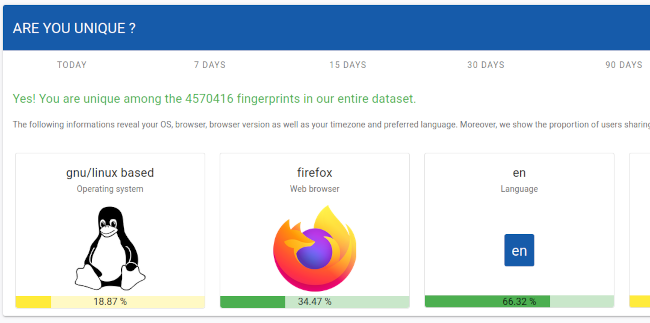
In addition ‘uniqueness’, in itself, is not a strong measure of
traceability. That my browser fingerprint is unique at some point in
time is irrelevant if my fingerprint will be different tomorrow, whether
it remains unique within the fingerprinter’s database or not.
Of course, these facts also mean that it’s difficult to assess the
effectiveness of our countermeasures: our assessment can only be
approximate, because we don’t actually know what real fingerprinters are
doing.
Another small piece of good news is that browser developers are
starting to realize how much of a hazard fingerprinting is, and to
integrate more robust countermeasures. We don’t necessarily need to
resort to plug-ins and extensions, which are themselves detectable and
become part of the fingerprint. At present, Brave and Mullvad seems to
be doing the most to resist fingerprinting, albeit in different ways.
Librewolf has the same fingerprint resistance as Firefox, but it is
turned on by default. Probably anti-fingerprinting methods will improve
over time but, of course, the fingerprinters will get better at what
they do, too.
So what can we do?
First, and most obviously, if you care about avoiding tracking, you
must prevent long-lived cookies hanging around in the browser,
and you must use a VPN. Ideally the VPN should rotate its
endpoint regularly.
The fact that you’re using a VPN, of course, is something that the
fingerprinters will know, and it is does make you stand out.
Sophisticated fingerprinters won’t be defeated by a VPN alone. But if
you don’t use a VPN, the trackers don’t even need to
fingerprint you: your IP number, combined with a few other bits of
routine information, will identify you immediately, and with
near-certainty.
Many browsers can be configured to remove cookies when they seem not
to be in use; Librewolf does this by default, and Firefox and Chrome do
it in ‘incognito’ mode. The downside, of course, is that long-lived
cookies are often used to store authentication status so, if you delete
them, you’ll find yourself having to log in every time you look at a
site that requires authentication. To mitigate this annoyance, browsers
generally allow particular sites to be excluded from their
cookie-burning policies.
Next, you need to be as unremarkable as possible. Fingerprinting is
about uniqueness, so you should use the most popular browser on the most
popular operating system on the kind of hardware you can buy from PC
World. If you’re running the latest Chrome on the latest Windows 11 on a
two-year-old, bog-standard laptop, you’re going to be one of a very
large group. Of course Chrome, being a Google product, has its own
privacy concerns, so you might be better off using a Chromium-based
browser with reduced Google influence, like Brave.
You should endeavour to keep your computer in as near its stock
configuration as possible. Don’t install anything (like fonts) that are
reportable by the browser. Don’t install any extensions, and don’t
change any settings. Use the same ‘light’ theme as everybody else, and
use the browser with a maximized window, and always the same size. And
so on.
If possible, use a browser that has built-in fingerprint resistance,
like Mullvad or Librewolf (or Firefox with these features turned
on).
If you take all these precautions, you can probably reduce the
probability that you can be tracked by you browser fingerprint, over
days or weeks, from about 99% to about 50%.
50% is still too high, of course.
The downsides of
resisting fingerprinting
If you enable fingerprinting resistance in Firefox, or use Librewolf,
you’ll immediately encounter oddities. Most obviously, every time you
open a new browser window, it will be the same size. Resizing the window
may have odd results, as the browser will try to constrain certain
screen elements to common size multiples. In addition, you won’t be able
to change the theme.
You’ll probably find yourself facing more ‘CAPTCHA’ and similar
identity challenges, because your browser will be unknown to the server.
Websites don’t do this out of spite: hacking and fraud are rife on the
Internet, and the operators of web-based services are rightly paranoid
about client behaviour.
You’ll likely find that some websites just don’t work properly, in
many small ways: wrong colours, misplaced text, that kind of thing. I’ve
found these issues to be irritations rather than show-stoppers, but you
might discover otherwise.
Is browser fingerprinting
legal?
The short answer, I think, is that nobody knows, even within a
specific jurisdiction. In the UK, the
Information Commissioner’s Office takes a dim view of it, and it
probably violates the spirit of the GDPR, if not the letter.
The GDPR is, for the most part, technologically neutral, although it
has specific provisions for cookies, which were a significant concern at
the time it was drafted. So far as I know, nobody has yet challenged
browser fingerprinting under the GDPR, even though it seems to violate
the provisions regarding consent. Since there are legitimate reasons for
fingerprinting, such as hacking detection, organizations that do it
could perhaps defend against a legal challenge on the basis that
fingerprinting is necessary to operate their services safely. In the
end, we really need specific, new legislation to address this privacy
threat.
I suspect that many people who take an interest in Internet privacy
don’t appreciate how hard it is to resist browser fingerprinting. Taking
steps to reduce it leads to inconvenience and, with the present state of
technology, even the most intrusive approaches are only partially
effective. The data collected by fingerprinting is invisible to the
user, and stored somewhere beyond the user’s reach.
On the other hand, browser fingerprinting produces only statistical
results, and usually can’t be used to track or identify a user with
certainty. The data it collects has a relatively short lifespan – days
to weeks, not months or years. While it probably can be used for
sinister purposes, my main concern is that it supports the intrusive,
out-of-control online advertising industry, which has made a wasteland
of the Internet.
In the end, it’s probably only going to be controlled by legislation
and, even when that happens, the advertisers will seek new ways to make
the Internet even more of a hellscape – they always do.