table of contents
Kindles are BookTok’s beloved device, where you can scroll through thousands of videos on the best accessories and gadgets to maximize your reading experience. One thing about BookTok girls: they’re right. While I’ve spent hours watching videos of people decorating their Kindle with the remote and PopSocket, I didn’t really understand the extras until I tried them for myself.
You might roll your eyes at the gooseneck stand or the page-turning remote – I did once – but you’re missing out on a life of luxury. Now that the weather has cooled off, every night you’ll find me lying in bed with my Kindle in the stand and the remote page turner in hand.
And keep in mind that while Kindles are the most talked-about e-readers, there’s a lot of love for Kobo e-readers on BookTok and here at Mashable. Even though the Kindle Paperwhite is our favorite e-reader, we still love the Kobo Clara Color and Kobo Libra Color. So don’t worry that all the accessories here aren’t exclusive to the Kindle – you can use them with a variety of other e-readers too. In fact, Kobo is launching its own remote in the coming months.
So if you’re in the mood to extend your reading time, we’ve rounded up all the essential Kindle accessories. Oh, and with Black Friday 2025 around the corner, we’re seeing early deals on both the Kindle and accessories. Ahead of Black Friday, you can find a new Kindle Paperwhite on sale for just $106.99, and we expect even more deals to drop come November 28th.
remote page turner
$15.99
on amazon
$19.99
save $4.00
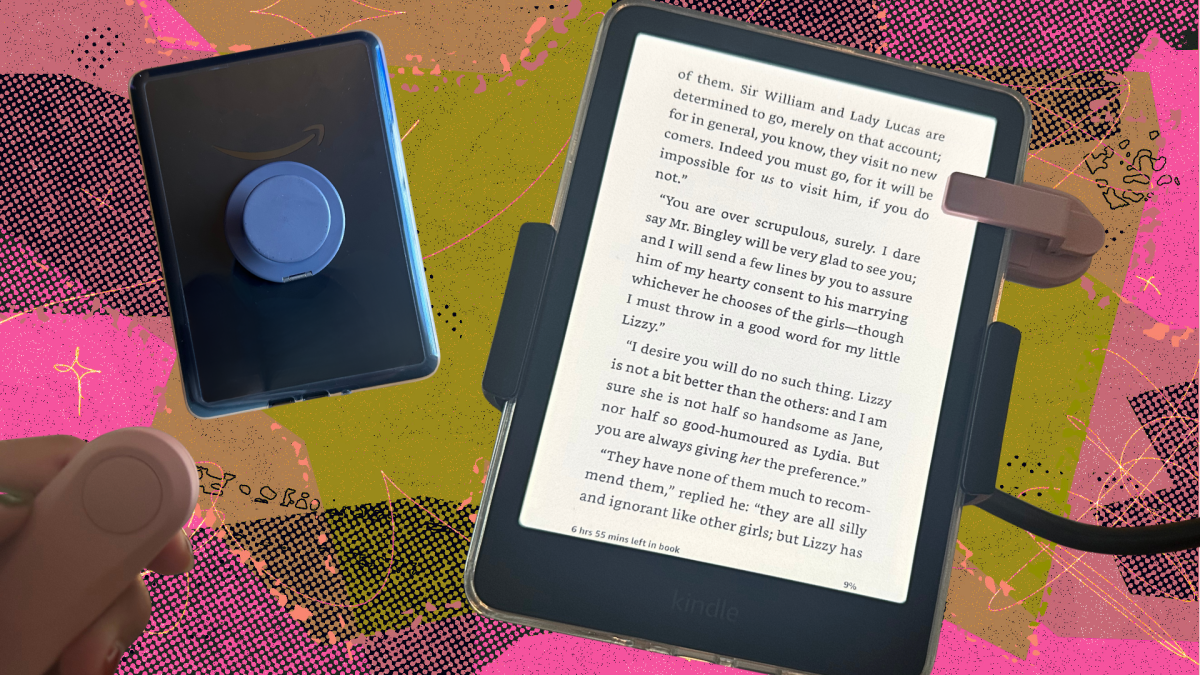
The remote control page turner was one of the first Kindle-adjacent gadgets to pop up in my feed. It clips onto the side of the Kindle, and then you press a button on the remote to turn the page instead of tapping or swiping the screen. Tapping the screen is easy enough, but the page turner is an extra layer of convenience.
At the end of the night, when you want to get cozy in bed by hiding under the blankets to stay warm, the remote allows you to do so. Combined with gooseneck stand? Your autumn reading is about to be the coziest yet.
And while the page turner is great for being casual, it’s also ideal for when you’re using the Kindle on a treadmill.
gooseneck stand
$19.99
on amazon
$29.99
save $10
While the remote page turner helps you click through your book, to be truly hands-free, you’ll also need to prop up your e-reader. Enter the gooseneck stand. After watching this viral video, I and the rest of the internet were inspired to get a clip-in stand for the e-reader.
Mashable Trend Report
And let me tell you, this stand is a luxury to have. While the Kindle is still light, your hand inevitably gets tired from holding the device when you’re on a reading marathon. But having a gooseneck stand keeps the Kindle within reading distance without any arm fatigue.
To test the gooseneck stand, I tried the Magpia Gooseneck Stand, which is compatible with a Kindle or Kobo e-reader (I used it with both). I find the folding arm of this stand to be a little stiff, but overall, it still works well.
clear case
There are plenty of Kindle cases out there in the ocean, but the most popular option is a simple, clear case from BookTok. Sure, it sounds boring, but the exciting part of the clear case is being able to decorate and dress it up as your heart desires. Some people also purchase inserts to replace over time.
And if you’re interested in using the PopSocket Grip with your Kindle, I recommend getting a case that’s MagSafe compliant so you can take it on and off. PopSockets recently released its first Kindle case that is also MagSafe.
MagSafe PopSocket
PopSockets are already the best ergonomic grip for your phone, so why wouldn’t they be the best grip for another handheld device? When I’m not using my Kindle with the gooseneck stand, I like to use it with the PopSocket Grip for an ergonomic hold.
With the traditional PopSocket Grip, you attach it to the device with an adhesive but that means once it’s on, it’s on. But using the MagSafe PopSocket grip allows you to attach and reattach the grip, depending on how you want your Kindle to lie flat.
I personally use the PopSockets MagSafe Kick-Out Stand with my Kindle because I use it on my phones, and I like that I can prop it up to stand vertically. However, PopSockets has launched a line of bookish MagSafe grips to go along with its line of Kindle cases.

My PopSockets Kick-Out Grip serves as a stand on the go.
Credit: Samantha Mangino/Mashable
strepsicle bandages
$19.99
on amazon
$21.99
save $2
If PopSockets grips aren’t really your thing, the Strapsicle is a good alternative. The straps of the Strapsicle attach to the corners of your e-reader, forming a cross pattern. Your hand then slips through the straps, providing an easy grip on your e-reader. While I personally prefer the feel of the PopSockets grip, the Strapsicle allows your hand to lie flat so it doesn’t get cramped while holding on. The Strapsicle works best when it fits snugly, so using it with a case can be a little tricky.

Simply put your hand between the straps for an easy grip.
Credit: Samantha Mangino/Mashable
pages kindle case
Before I delved deep into the world of Kindle accessories, I really wanted a good case. After several well-posted Instagram ads, I came across a case of the page. Not only do they have lots of beautiful designs, but they also make cases for a variety of e-readers, including the entire Kindle and Kobo lineup.
The case automatically wakes and puts your e-reader to sleep, and includes a hand strap for a good grip while reading. Also, I like this case because it protects the poorly placed power button on the e-reader. This way I don’t accidentally press the button while I’m reading on the treadmill.