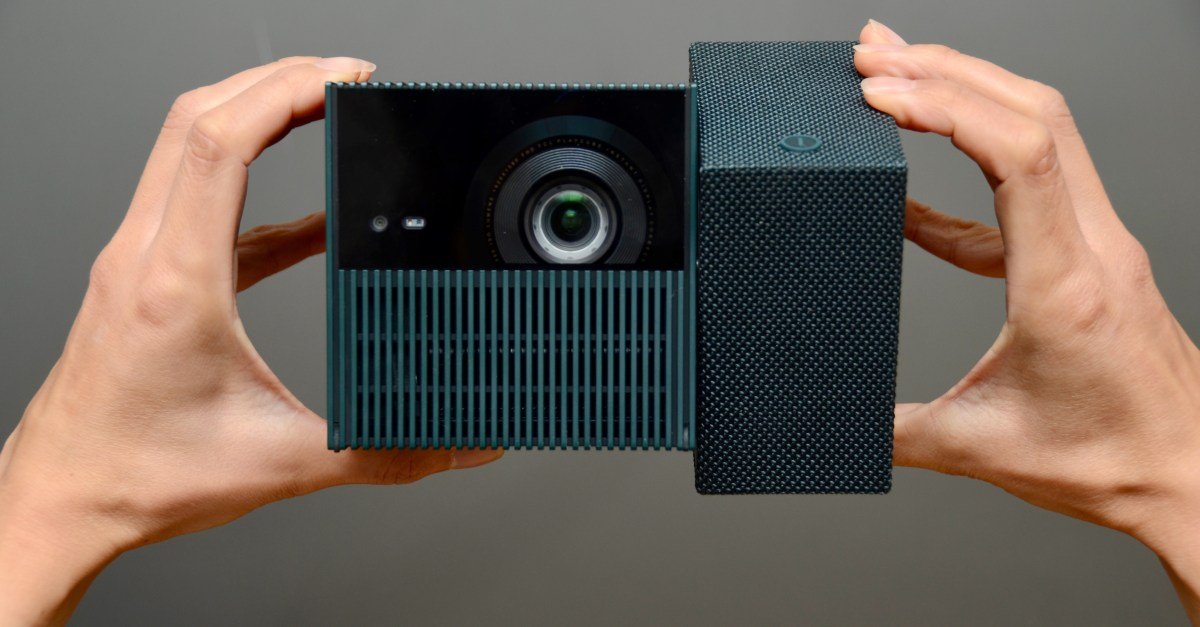
The best all-in-one portable projector is one that makes all the right compromises. It needs to balance image and sound quality with battery life and responsiveness in a device that isn’t too expensive and small enough to carry anywhere. TCL’s fun little PlayCube offers the right mix to justify paying $800 for a 1080p projector in 2026.
I tested the TCL PlayCube running Google TV during a two-month road trip and then at home for a few months. It’s so small, adaptable, and enjoyable that I had no problem setting it up at a moment’s notice, anywhere, day or night.


Good
- 3 hours battery in brightest mode
- Clever, swivel design helps with placement
- bright for its size
bad
- sometimes dull
- standby power quirk
- mono, muddy sound
TCL says the PlayCube’s 90-degree rotating design is inspired by the Rubik’s Cube. Just give it a twist whenever you need to lift the image above the obstacles. Otherwise, you can mount it on a tripod via the threaded connector on the bottom, or flip it on its back to view the ceiling while sleeping. The PlayCube also includes all the automatic adjustment modes you’d expect in a modern portable projector, including focus, keystone correction, obstacle avoidance, screen detection, and eye protection.
The other notable thing about the PlayCube is its brightness. 750 ISO lumens isn’t bright for a home theater projector, but it’s plenty bright for a portable that easily fits in the palm of your hand, measuring 149.8 x 96.6 x 96.6 mm (5.90 x 3.80 x 3.80 in) and weighing 1.3 kg (2.7 lb).
It’s bright enough to watch videos during the day when all those lumens are focused into a tight 30-inch rectangle inside my van, or at night when projected against it at 100-inches. Unfortunately, it doesn’t have the color-adaptation technology found in Samsung’s new (battery-less) Freestyle+ projector, so the blue-gray hull affected the palette. Despite this, it was still very watchable.


The audio produced by the PlayCube’s lone 5W speaker is fine. There’s no stereo separation, but it’s loud enough to fill a room. It just lacks completeness, warmth and detail. Music by Florence and the Machine and Kendrick Lamar sounds tinny and thin. The screeching tires, gunshots, and explosions from 007’s chase scene created a messy soundscape, but it was still enjoyable. The sound is uncomfortably harsh above 60 percent volume, which is still quite loud. During an outdoor movie night, I was forced to keep the volume no higher than 20 percent to avoid disturbing the nearest neighbor about 50 meters away.
Alternatively, you can connect headphones or self-powered speakers via the audio jack or Bluetooth. The projector can also be used as a Bluetooth speaker, turning off the lamp but, annoyingly, not the fan. That fan produces 27dB when measured at a distance of one meter, which is quite quiet for a projector but still noticeable during static moments.

Runtime of the PlayCube’s 66Wh battery was inconsistent, but it performed very well in recent tests. TCL claims up to three hours – I measured exactly three hours and one minute after a full charge in the projector’s brightest mode while streaming aviator On Netflix, a movie that lasts 2 hours and 50 minutes. It also works with USB-C power banks if you need even more time. The PlayCube recharged from zero to full in 104 minutes with a 65W USB-C charger.
I experienced wild variations in battery life during my four months of testing, which I think can be attributed to TCL’s power management in standby mode. A short press of the power button deactivates the projector, allowing it to turn on in less than 30 seconds. In standby, the fan spins periodically, which wastes energy – which may be why I noticed serious battery drain when vanlifing in hot climates. The problem disappeared when I returned to mild temperatures at home. A firmware update might have helped too.
Despite this, you can still long press the power button for a complete shutdown to avoid any phantom power drain that may occur in standby. The PlayCube takes about 80 seconds to boot, but this can be speeded up by turning off some automatic screen adjustment features.
1/13
Like most battery-powered projectors, the user interface can be sluggish at times. Sometimes Google TV requires a frustrating second or two before responding to navigation commands from the remote control. Automatic image adjustment features are also slow to start. But I’m grateful when they do, even if the obstacle is hit or miss. Fortunately, everything can still be fixed manually.
TCL says the PlayCube is “specifically designed for camping projection.” This makes me – an avid vanlifer – its primary target, and I came away very impressed. At $799.99, TCL’s PlayCube Projector isn’t cheap, but you usually won’t find this mix of brightness, battery life, and portability for less. Xgimi’s Halo+ comes in at a similar price, only in a larger package that offers better stereo sound but less battery life… but it’s currently on sale for just $449, which is a pretty good deal.
Photography by Thomas Ricker/The Verge
<a href
Услуги по настройке https://sysadmin.guru и администрированию серверов и компьютеров. Установка систем, настройка сетей, обслуживание серверной инфраструктуры, защита данных и техническая поддержка. Помогаем обеспечить стабильную работу IT-систем.
A website with unblocked games for free online play. Popular browser games, arcades, platformers, racing games, and puzzles are available with no downloads or restrictions on any device.
Curious about the weather Podgorica Montenegro today. Detailed 7- and 10-day forecasts, including temperature, wind, precipitation, humidity, and pressure. Up-to-date information on the climate and weather conditions in Podgorica for travel and leisure.
купить золотое кольцо купить помолвочное кольцо с бриллиантом
Если интересует новый Ментал слот – мы вынесли всё в отдельный пост: что изменилось/что добавили, первые впечатления, детали по бонускам и на что обратить внимание перед стартом. Удобно открыть, быстро разобраться и уже дальше обсуждать в группе.