If you’ve ever wondered why the quality of your music drops dramatically when you answer a call on your Bluetooth® headset, you’ve experienced firsthand one of the major limitations of A2DP. Its unidirectional nature means that enabling the microphone requires switching to HFP, resulting in a significant reduction in audio quality. Additionally, Bluetooth® Classic exhibits high latency (100-200ms for A2DP) and high power consumption by modern standards, resulting in insufficient battery life for all-day use cases such as hearing aids. These and many other limitations have led vendors over the years to push this old technology to its limits and develop non-standard solutions, such as Google’s Audio Streaming for Hearing Aids (ASHA) profile and Apple’s Made for iPhone (MFi) extensions.
Enter LE Audio, introduced in 2020 with Bluetooth® 5.2, representing a fundamental change in the Bluetooth® audio architecture. This post explains what changes LE Audio brings, what its support status is on Linux, and what’s next for building great Linux-based products that utilize this functionality. The content of this post was originally a talk presented at the Embedded Linux Conference Europe 2025, which you can view here.
What is LE Audio?
LE Audio is built on the Bluetooth® Low Energy (LE) stack instead of the Basic Rate/Enhanced Data Rate (BR/EDR) stack used by Classic Bluetooth®. This is not a small technical detail. Bluetooth® Low Energy is a completely different wireless communications stack from Bluetooth® BR/EDR, which is equivalent to the difference between Wi-Fi and Bluetooth®. This new base achieves significantly lower power consumption and latency, making possible use cases that were previously impractical or impossible.
Unlike Bluetooth® Classic’s approach of defining separate profiles for different scenarios, LE Audio provides a modular framework of profiles that work together. At its core is the Basic Audio Profile (BAP), which defines the audio transport for all use cases. Built on top of this are supporting profiles: Volume Control Profile (VCP), Microphone Control Profile (MICP), Coordinated Set Identification Profile (CSIP – for device “sets”, like earbuds), Call Control Profile (CCP – replacing HFP functionality), and Media Control Profile (MCP – replacing AVRCP). Higher-level profiles such as the Telephony and Media Audio Profile (TMAP), Hearing Access Profile (HAP), and Public Broadcasting Profile (PBP) then define specific use cases built on these bases. And at the codec level, it’s all powered by the newly developed Low Complexity Communication Codec (LC3).
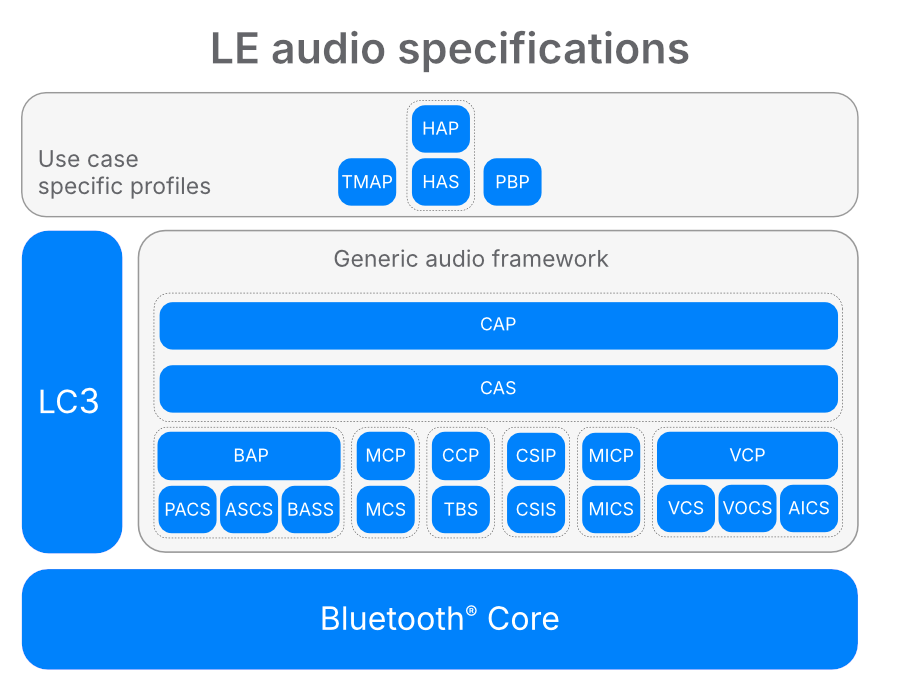
Image Source: https://www.bluetooth.com/learn-about-bluetooth/feature-enhancements/le-audio/le-audio-specialations/
AuraCast™: Broadcast audio to multiple devices
One of LE Audio’s most significant innovations is AuraCast™, enabled through the Public Broadcast Profile. Auracast™ allows audio to be broadcast to multiple receivers simultaneously, almost like traditional analog radio, but with all the benefits of a secure digital wireless connection. The applications are fascinating: assistive listening in public spaces like theaters or conference halls, access to audio sources like TVs in public places, or silent movie nights with friends in your living room.
AuraCast™ sources work similar to Wi-Fi access points where users can use a QR code or scan the area to find and connect to the source of their choice. Transport is handled via isochronous streams, providing the synchronized delivery required to coordinate multiple receivers.
LE Audio on Linux: BlueZ and Pipewire
On Linux, LE audio support is implemented through BlueZ for the Bluetooth® host stack and Pipewire for audio routing. PipeWire has excellent Bluetooth® support, implementing all major profiles including A2DP, HSP/HFP, ASHA hearing aid protocol, and now LE Audio, in both gateway and hands-free roles, along with multiple codecs.
Specifically for LE audio, PipeWire supports BAP in all roles (unicast sink/source and broadcast sink/source), handles volume control profiles in coordination with BlueZ, and manages coordinated device sets by presenting the earbuds as a single logical device while routing audio to both physical devices.
Hardware and Software Requirements
Turning on LE Audio on your Linux system requires careful attention to both hardware and software components. You will need Linux kernel 6.4 or later, although we strongly recommend using later versions due to ongoing improvements. The latest versions of BlueZ and PipeWire are also required.
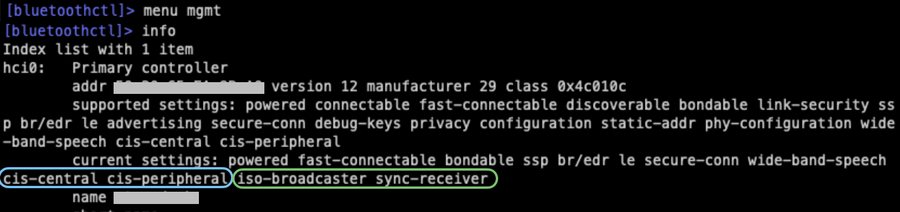
On the hardware side, controller support varies. Many vendors, such as Intel, NXP, MediaTek, Qualcomm, Nordic and others implement LE Audio support in their recent models. However, Auracast™ support is not always provided. For example, Intel supports LE Audio in both its AX110 and BE200 series, but only the BE200 supports Auracast™.
You can verify the capabilities of your controller by using bluetoothctlManagement Menu (menu mgmtlook for cis-central cis-peripheral for unicast support, and iso-broadcaster sync-receiver For broadcast support.
Configuration and Setup
configuring LE audio requires enabling experimental features in BlueZ /etc/bluetooth/main.confIncluding iso socket uuid in kernel experimental options. ISO sockets is a Linux kernel feature that is currently marked experimental but is nearing stable status, so hopefully this requirement will be simplified in a future release.
Experimental = true
KernelExperimental = ...,
In PipeWire, WirePlumber will enable LE audio support by default unless you have a custom Bluetooth® configuration, in which case you should refer to the documentation bluez.roles Option.
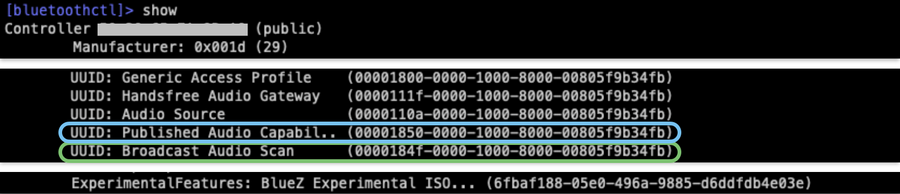
After configuration, running show order in bluetoothctl “Publish Audio Capabilities” for LE Audio and “Broadcast Audio Scan” for AuraCast™ should display, confirming that everything is set up correctly.
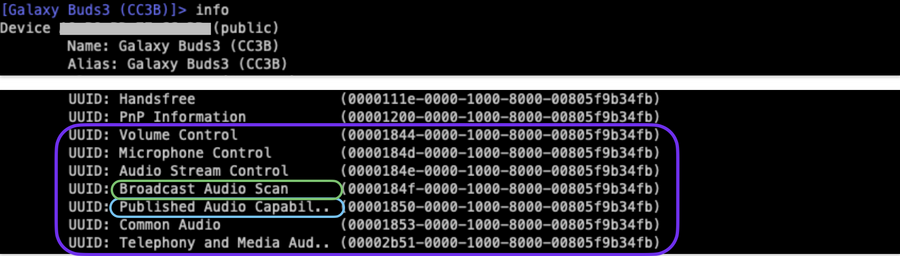
Similarly, after connecting to a remote Bluetooth® device that supports LE Audio, you should be able to see the same listing while playing info order in bluetoothctlAlong with a list of other LE audio profiles. remember that info The command displays the capabilities of the connected remote device, while show The command displays the capabilities of the local controller.
dual stack challenge
One significant challenge you need to be aware of involves dual-stack devices that support both Bluetooth® Classic and LE Audio. Since these are separate stacks, switching between them currently requires disconnecting the device and reconnecting it with the other stack configured as the “preferred”. This is fundamentally different from the classic A2DP vs HFP profile selection, which can be done immediately without disconnecting.
currently, bearer order in bluetoothctl allows to specify le Or bredr Mode as favorite. BlueZ 5.84 will introduce improved tooling with the D-Bus API for explicit stack connection state and programmatic control. However, the user experience challenge of stack switching and per-stack pairing remains an active area of development.
the way forward
There is still significant work left for LE Audio to do in the Blues ecosystem. Contributors are actively engaged in improving usability through both command-line and GUI tools, including desktop integration. Things like Auracast™ controls for browsing and connecting to broadcast sources, as well as controls for switching between LE Audio and Classic, are on the high priority list.
We’re also working on building a unified call control API that works on both LE Audio’s Call Control Profile and Classic Bluetooth®’s HFP. This also includes moving parts of the HFP implementation from Pipewire to BlueZ, which will eventually eliminate the “telephony” support in Pipewire that was introduced earlier this year.
Additionally, to ensure everything works according to specification, the BlueZ+ Pipewire stack must undergo official qualification testing and receive approval from the Bluetooth® Special Interest Group (SIG). This is a huge amount of work that we aim to have under control within 2026.
Finally, the modular nature of LE Audio means that Bluetooth® SIG continues to develop new features that will require ongoing implementation work in the Linux stack.
we can help!
LE Audio and Auracast™ represent substantial advances in wireless audio capabilities for Linux systems. Although the technology is still maturing and some rough edges remain, the foundation is solid and actively developed. Implementation spans multiple components, from kernel drivers through BlueZ and Pipewire to user-facing applications, requiring careful coordination across projects. Thankfully, it has been adopted by a wonderful community of people who are in active communication and collaboration with each other, dedicated to making it the best LE Audio implementation.
If you’re considering deploying LE Audio on your embedded Linux system, our team has hands-on experience with this entire software stack and can assist every step of the way, from evaluating hardware compatibility and configuring BlueZ and Pipewire to applying custom patches and ensuring your system meets qualification requirements. We’re also active contributors to both BlueZ and Pipewire, keeping us informed about the roadmap and ongoing development. Contact us to find out more!
<a href