IPv6 connectivity
Maybe it’s time I figure out how to enable IPv6 on my RouterP and network! First of all, configuring dhcpcd was quite simple and IPv6 connectivity worked almost instantly. However, after later rebooting the router and checking that everything was still working, it became intermittent. For some reason my ISP (HyperOptic) upstream router (not in my house) had decided to stop responding to Router Solicitation (RS) packets sent by my router.
Router solicitations (RS) are part of the IPv6 Neighbor Discovery Protocol (NDP) and are how IPv6-enabled devices discover a router on a link, such as the default gateway. When an RS packet is broadcast, an IPv6-enabled router MUST respond with a Router Advertisement (RA) packet advertising its presence. Routers also transmit RAs at periodic intervals; These are called unwanted router advertisements.
While HyperOptic’s upstream router did not respond to RS packets, it did send unsolicited RA packets approximately every 15 – 30 minutes. In fact, it will send two identical RA packets at the same time, what is happening there?
This meant that after re-plugging the WAN cable or restarting the router, this would happen:
- Successfully achieve DHCPv6 prefix delegation,
- …so take 30 minutes before you get unwanted RA,
- …leaving the network with valid IPv6 addresses but no default route.
This resulted in the network appearing slow and strange, as devices attempted to connect to websites using IPv6 first and would sometimes fall back to IPv4. The same happened with the official home router provided by HyperOptic.
After some experimentation I discovered that changing the MAC address of the WAN interface to another valid address would trigger the ISP’s upstream router to send an unsolicited RA immediately after a new DHCPv6 prefix delegation is assigned. This happens only once per MAC address change. I verified this by swapping between two routers – RouterP and the home router supplied by HyperOptic. Since they have different MAC addresses, an RA will be sent immediately after DHCPv6 is completed, and IPv6 connectivity will work immediately. However, upon plugging the same router again the network will once again appear broken for a short period of time due to the lack of router advertising and the disappearance of the default IPv6 route.
So, if you are facing this issue while using HyperOptic Home Router, there is not much you can do about it. But if you’re running your own custom Linux router, you can use macchanger As a quick solution:
sudo macchanger -e eth1
sudo systemctl restart dhcpcd
The WAN cable may need to be unplugged and plugged back in after running the command, as it seems HyperOptic only allows one MAC address change per cable plug-in.
Alternatively, since the default gateway address does not appear to change, it is possible to add the gateway address manually:
sudo ip -6 route replace default via (gateway IPv6 address) dev eth1 metric 2000
This can be automated by creating a dhcpcd hook script that connects the default gateway RENEW6 events.
HyperOptic also does not specify non-temporary addresses (ia_na), prefix delegation only (ia_pdRemoval ia_na From dhcpcd.conf to stop messages like eth1: DHCPv6 REPLY: No addresses have been assigned From spamming logs.
But we’re not finished yet!
packets out of order
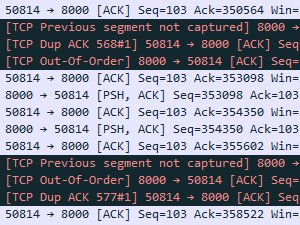
Another small but annoying problem I observed on the network was Random Out of Order (OOO) packets. There are many reasons for LLC packets to occur, such as network congestion, but these events were occurring repeatedly – even when streaming 192Kbps MP3s over gigabit Internet connections.
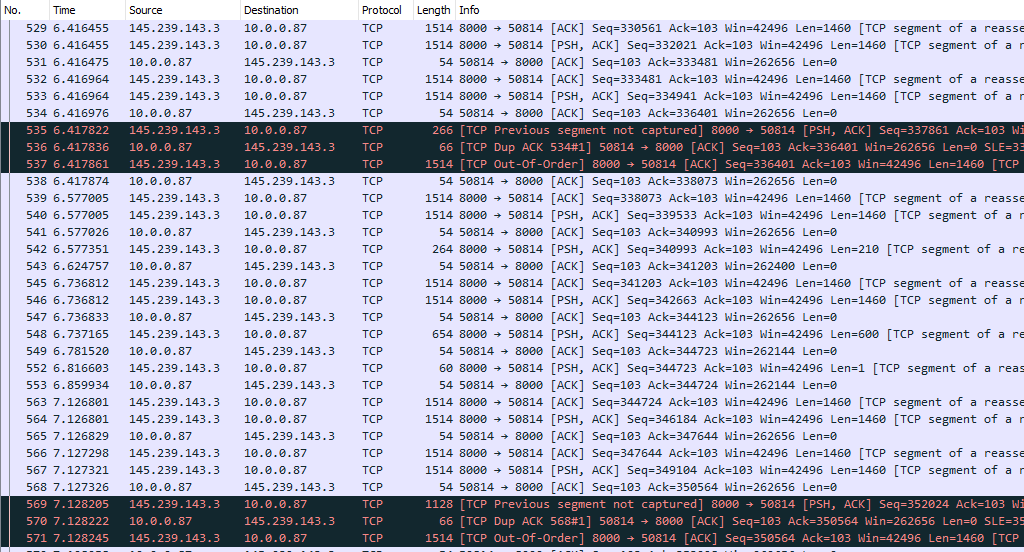
After a little Googling, I found this Reddit thread:
RFC4448 section 4.6
If a frame has a leading ‘4’ or ‘6’ destination MAC address, reordering of the packet may occur as it crosses the LAG on the L2VPN PW (RFC4448 states that this is the source MAC, but I haven’t found that yet).
The first nibble of the Ethernet header is the first character of the destination MAC. Also the first nibble version of the IP header. The router incorrectly assumes that if the MAC starts with ‘4’ it must be an IPv4 packet. If it starts with ‘6’ it must be an IPv6 packet.
Adding a control word to the PW fixes this as it forces the router to see ‘0’ instead of ‘4’ or ‘6’ after the MPLS label.
I believe this happens because the MPLS label has no field to indicate the upper layer. For example IP has protocol field, Ethernet has type field, TCP/UDP has port number. With MPLS there is no such field, so the router just assumes that the IPv4/IPv6 header follows, but when using PW/L2VPN it is actually an Ethernet header.
https://tools.ietf.org/html/rfc4448#section-4.6
As it turned out, the MAC address of my RouterP’s WAN interface started with 4changing it a0:de:ad:bb:ee:ff Fixed damaged packets quickly, hooray!
To make the MAC address permanent, create a file here /etc/systemd/network/01-wan.link Containing:
[Match]
MACAddress=(original WAN MAC address)

[Link]
Name=eth1
MACAddress=a0:de:ad:bb:ee:ff
I wonder how many people may be affected by out of order packets as their router’s WAN MAC address starts 4 Or 6Which can be especially troublesome for online gaming. D:
<a href