a brief review
ReMarkable is marketed as a distraction-free reading and writing tool, and I can confirm that it excels at writing. The friction of the stylus on the ePaper display feels just right, latency is so low that it looks like writing with ink takes a moment to set on the page, and you can customize the brushes just enough to get whatever effect you want. I haven’t written this much since I was in high school and I guess I missed it.
The Marker Plus includes an eraser on the other end of the stylus; If you are thinking about getting one of these I would recommend spending a little more to get this version of the marker as I can imagine that erasing things could be very annoying. You have other options for erasing, a two-tap gesture to undo the last stroke (which I use a lot to delete the last letter if it didn’t turn out right), and a selection eraser tool that’s useful for deleting entire paragraphs.
Touch gestures are no good: they don’t always register and they always require a little more pressure than you expect. Navigating with the stylus is more pleasant, but some things (turning pages) you can only do by swiping. The Remarkable 1 had three physical buttons below the screen, and I wish the second iteration had kept them.
Reading PDFs is useful (reading paper is a bit of a hassle as you have to zoom in just a bit to read comfortably) and I haven’t tried the ebook yet.
Apparently ReMarkable has its own subscription service called Connect that unlocks some useful features like unlimited cloud storage (the free plan starts deleting files from the cloud after 50 days of inactivity), editing documents in the companion desktop and mobile apps, “premium templates”, screen sharing, an extended warranty, and a few other things.
At $29.90 per year it’s honestly not that bad a deal, and the limitations on the free plan aren’t too bad either. The signup process for My.reMarkable deceptively prompts you to sign up for a 50 day trial and I couldn’t find a comprehensive page that shows what you get without paying, but if you don’t give up your payment information you’ll find you can still view your cloud synced files and enable Google Drive/Dropbox/OneDrive integration.
reading sheet music
One of the reasons I wanted to get an ePaper tablet was to read sheet music. I sing in a choir and we have a concert coming up during which we won’t be allowed to use a regular tablet because of the backlighting, and this seemed like the perfect excuse to get one of these things to play.
Reading sheet music on Remarkable is no good. The refresh rate is serviceable when flipping pages, and annotating PDFs with the stylus is a great experience, but there are a few features I’ve used on MobileSheets on my tablet that ReMarkable doesn’t support:
- Cutting pages apart. The document viewer lets you zoom in, but it’s not precise and applies to the entire document, and I don’t think the zoom level and offset is saved when switching to another document.
- Turning half a page. When you turn a page in MobileSheets, you can set it to overlay half of the next page over the current page so you can follow the last one while checking what’s happening next.
- Turning pages with one touch. I mentioned that I don’t really like swipe gestures and I’m not expecting to fight gesture recognition when trying to turn a page during a display.
- Library Management. ReMarkable only displays the file name of a PDF, but I prefer to keep my scores indexed by both name and composer/arranger and I would prefer to use metadata rather than a naming scheme to manage them.
- Setlist. You won’t want to search for the next piece during a performance and most pieces will be shared between multiple concerts. Although you can organize documents by folder, duplicating a score into several different folders is not ideal.
These features cannot be compromised for a good music sheet reader and ReMarkable’s stock software is not top notch. When I bought the Remarkable 2 I thought I could Now! For this write your own PDF reader and manager and use these features in it.
Running Homebrew Software
The ReMarkable is a computer just like any other computer, so I assume that since I bought it, I own it, and I should be able to run whatever software I want on it. I have to give it due credit on this front. It is noteworthy that the company could have easily locked the device so that you can pay for its subscription and buy new versions of the device when support for the old device ends, but if you go into Settings > Help > Copyright & License In the menu you’ll find a paragraph explaining that the end user must be able to modify the software running on the device to comply with the GPLv3, and below that a brief explanation on how to get SSH back into the markable form. root,
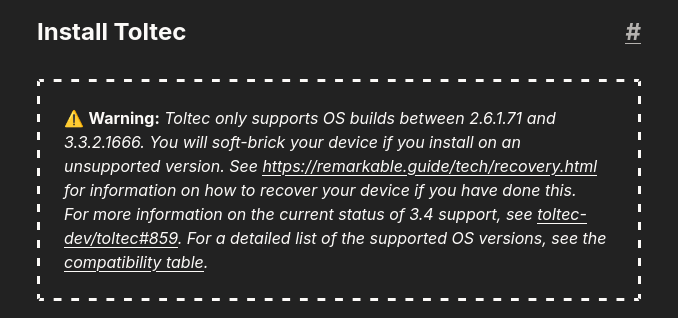
At first glance Remarkable also has an active homebrew software ecosystem. There is a community-maintained wiki with guides on how to install Toltek (a package manager) and develop software for the device. After unpacking the tablet I was eager to run Toltec and install some software, but…

Toltec has strict limitations on what versions of ReMarkable OS it supports. After unboxing and setting up my Remarkable 2 I reached version 3.23.0.64, which is far beyond the version supported by Toltec. Am I ripe? Well, the guide states that you can do Downgrade to a different OS version, you may…
Warning for downgrading from 3.11.2.5 or higher to a version lower than 3.11.2.5
If your reMarkable device is on or above 3.11.2.5 and you wish to downgrade to a version below 3.11.2.5, CodexCTL cannot currently do so. Please see #95 (comment) for manual instructions.
Well, it looks like you can do that, but you’re going to have trouble if you want to downgrade that far. But why would I have to do this, have the maintainers lost interest in it? Let’s take a look at the GitHub issue that tracks new OS build support.

Aah. And then what exactly is rm2fb?
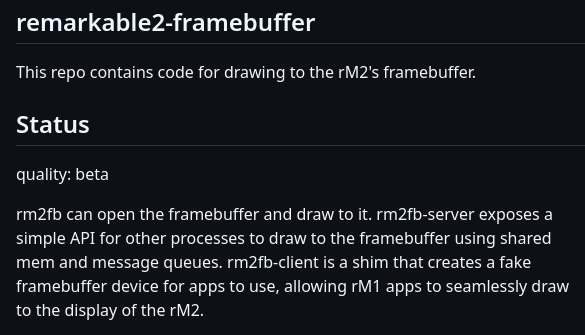
Ok. I don’t understand why you would need to use shared memory and message queues to draw the framebuffer, but maybe the rest of the README has more clues on that. If you scroll down to the FAQ there is a useful link called How does rm2fb work?
The server process will depend on the use of one of these functions
xochitlOrremarkable-shutdownBut those processes don’t actually run. We use LD_PRELOAD to handle the process, likeLD_PRELOAD=rm2fb.so xochitlAnd then we use our own main() func but call into the API what we need to 1) start the SWTCON thread and 2) send the update. If we go to the server model, this only needs to happen once (rather than making each application do this dance).
At this point we should talk xochitl,
Proprietary Software Crisis
xochitl is the main application running on reMarkable, and it is proprietary software. Unfortunately this is also the only document the homebrew community has to run the framebuffer that draws the Remarkable’s e-paper display; The SDK provided by reMarkable only supports Qt Quick, so if you don’t want to use Qt or link to it libqsgepaper.so You are stuck in reverse engineering xochitl,
It seems that the display driver of the Remarkable 1 has been completely reverse engineered, but not that of the Remarkable 2 (except for individual attempts, which I’ll talk about later). Most homebrew programs for ReMarkable are written to draw directly on the framebuffer, and they expect to interact with ReMarkable 1’s framebuffer.
rm2fb Comes as a compatibility layer that allows programs that interact with the framebuffer of RM1 to run on RM2. Since RM2’s framebuffer driver was not completely reverse engineered at the time it was developed, rm2fb in the hook xochitl And uses its own code to interact with the framebuffer. depends on rm2fb Knowing the offsets and signatures of these functions xochitl binary, so obviously when the OS build changes and xochitl has been upgraded, those offsets and signatures have been invalidated and rm2fb Will stop working until someone reworks them.
At this point I had already loaded xochitl In Ghidra and I was starting to figure out how to use the framebuffer inside it. I mean, how hard can it be?
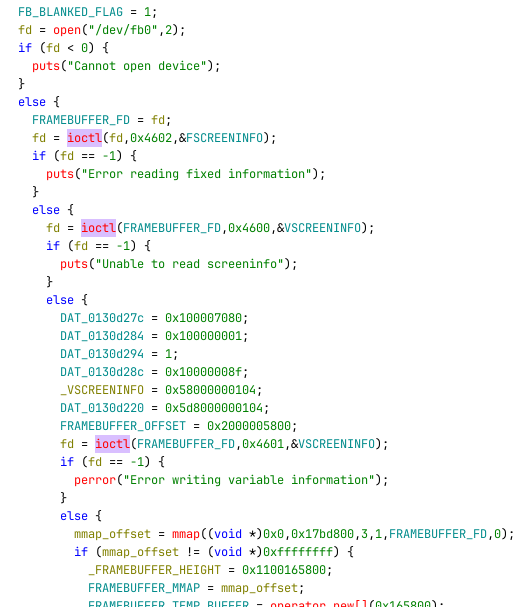
I searched for most calls ioctl And soon made some good progress. Then I figured if it was that easy then someone else with more experience than me would have already done it, so I did some more searching.
rm2fbAlso includes another link in the FAQ section, What about implementing open source SWTCON? which links to a versioned repository rm2fb It works on newer OS build versions, and is an early implementation of a reMarkable 2 display driver that relies only on xochitl For some things. I also joined the Remarkable Community Discord server to see if I could get more information. There were some posts by timemower (owner of rm2-stuff Repo) talking about the problems they faced while reverse engineering.

A few years later, Matteo Delabre shared a link to a repository containing a C++ driver for the Remarkable 2 display, which was not trusted xochitlHowever development seems to have stopped around 2022. Then a few months ago, jakubvf shared his own implementation of the RM2 display driver in Zig with support for SDL3.
It appears that none of these efforts have been successful, but Toltek maintainers are working on support for new OS build versions that can be safely downgraded from 3.23.* So I hope that in the near future I will be able to install Toltek on my device without messing with it too much.
As for me, I started my Yak Shaving series to create a music sheet reader by reimplementing Waved/Dazed in my poison of choice, Rust. I’m not going to finish this show in time for the concert but that’s okay.
This is where I want to include a section on how you can drive the display of the Remarkable 2 with just a few syscalls but I’m still figuring it out! This post is already longer than I intended, so I’ll leave that content for a possible future post on how to write software for the ReMarkable 2.
Finally, I want to thank the Remarkable hacking community for all their work on reverse engineering and developing software for it, because if not for their efforts I would definitely regret this purchase.
<a href