Under the radar, Google has added features that allow Gmail to access all private messages and attachments for training its AI models.
If you use Gmail, you should be aware of an important change that’s quietly going on. Reportedly, Google recently started automatically opting in for users to allow Gmail to access all private messages and attachments for training its AI models. This means your emails can be analyzed to improve Google’s AI assistants, like Smart Compose or AI-generated replies. Until you decide to take action.
The reason behind this is Google powering new Gmail features with its Gemini AI, which will help you compose emails faster and manage your inbox more efficiently. To do this, Google is using real email content, including attachments, to train and refine its AI models. Some users are now reporting that these settings are on by default instead of asking for an explicit opt-in.
Which means that if you don’t manually turn off these settings, your private messages could be used for AI training behind the scenes. Even though Google promises strong privacy measures like anonymization and data protection during AI training for anyone handling sensitive or confidential information, this may not sound reassuring.
Certainly, your Gmail experience will become smarter and more personalized. Features like predictive text and AI-powered writing assistance rely on this type of data. But is it worth the risk? I see plenty of reasons to make someone uncomfortable.
Yes, these features can make Gmail smarter and more personalized. But the lack of explicit consent feels like a step backward for people who want control over how their personal data is used.
how to get out
Opting out requires you to change settings in two places, so I’ve tried to make it as easy as possible. If I missed anything, feel free to let me know in the comments.
To opt out completely, you’ll need to turn off Gmail’s “Smart Features” in two different places in your Settings. Don’t miss a single one, otherwise AI training may continue.
Step 1: Turn off smart features in Gmail, Chat, and Meet settings
- Open Gmail on your desktop or mobile app.
- Click gear icon → View all settings (Desktop) or Menu → settings (mobile).
- Find the section called smart features In Gmail, Chat and Meet. You have to scroll down quite a bit.
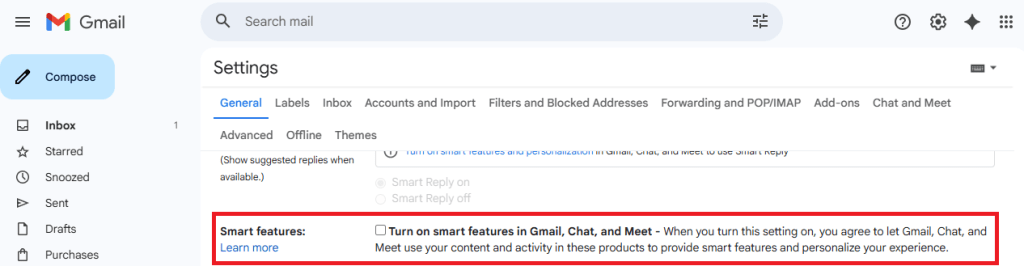
- Uncheck this option.
- Scroll down and hit save Changes If on desktop.
Step 2: Turn off Google Workspace Smart Features
- still in settingsfind out Google Workspace Smart Features,
- click on Manage workspace smart feature settings,
- You will see two options: Smart features in Google Workspace And Smart features in other Google products,
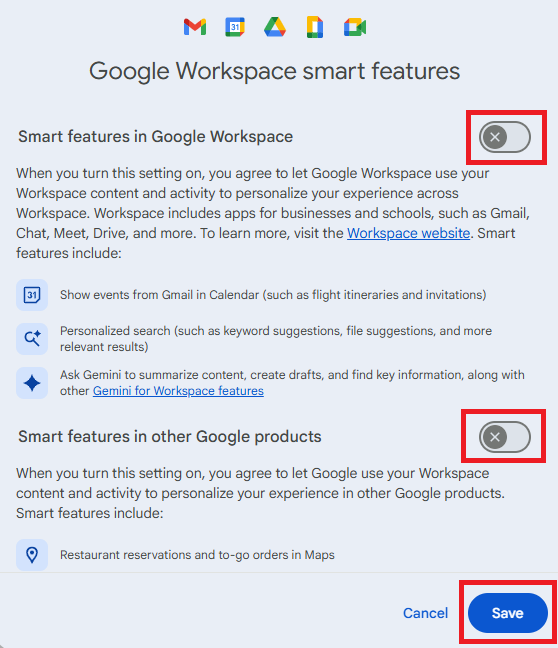
- Toggle both.
- save In this screen again.
Step 3: Verify If Both Are Off
- Make sure both toggles remain off.
- Refresh your Gmail app or sign out and back in to confirm the changes.
Why two places?
Google “Workspaces” separates smart features (email, chat, meet) from smart features used in other Google apps. To completely opt out of feeding your data into AI training, both must be disabled.
Comment
Your account may not yet show these settings enabled by default (mine doesn’t). It appears that Google is releasing it slowly. But if you care about privacy and control, double-check your settings today.
We don’t just report on privacy – we also give you the option to use it.
Privacy risks should never extend beyond the title. Take charge of your online privacy by using Malwarebytes Privacy VPN.