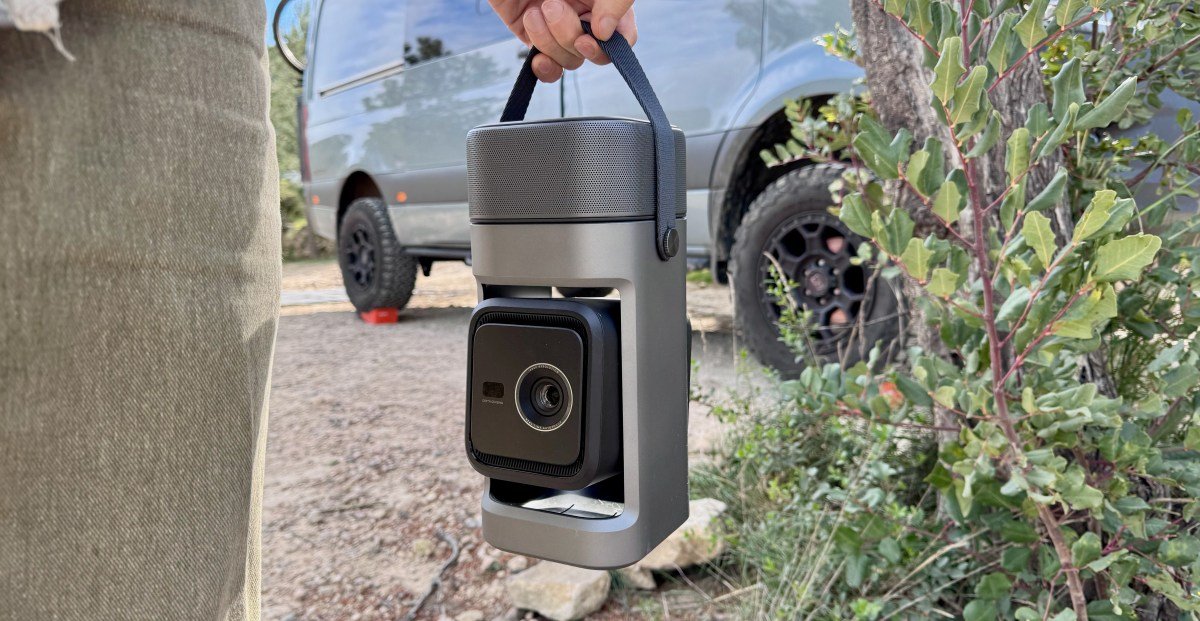
Anker’s Soundcore Nebula P1 isn’t the most portable Google TV projector I’ve ever reviewed, nor is it the brightest. It also does not have a built-in battery. Instead it’s a good video tool that focuses on sound.
The most striking feature of the Nebula P1 is a pair of speakers that separate to create true left- and right-channel separation. It sounds far better than typical all-in-ones like the supremely portable TCL PlayCube, the Xgimmy Mogo, or Anker’s popular capsule projectors.
I’ve been testing the $799 (currently on sale for $639) Nebula P1 while traveling through the European countryside in my van. It’s not my favorite portable projector, but I’ve grown quite fond of the P1 – just like cameras, sometimes the best projector is the one you have.


Good
- Detachable speakers produce great sound for portable
- It also works as a good Bluetooth speaker
- Tilting stand for easy placement
- Google TV comes with official Netflix support built-in
bad
- no built-in battery
- Poor screen detection and interference avoidance
- Tilt mechanism adds a lot of volume
Anker has been fighting back with innovative portable projectors that focus on better sound, first with the $3,000 Nebula X1 and then with the absurdly huge X1 Pro. The Nebula P1 cuts that extra weight from 72 pounds to 5.3 pounds, creating a truly portable (and much less expensive and capable) projector that’s perfect for vanlife or impromptu movie nights, wherever there’s a wall, sheet, or screen… and a power outlet or large USB-C battery.
In dark rooms, the P1 produces an enjoyable 1080p image that’s still the standard for portable projectors in this class. Its LED light source, rated at 650 ANSI lumens, isn’t enough to outshine rooms filled with too much ambient light, but it still looked good inside my van during the day when tightly focused on a nearby surface. But it’s the sound that really makes the P1 shine.

The detachable 10W speakers together produce a detailed and enjoyable soundscape. Over the course of a few weeks of testing I’ve become quite fond of this little pair of speakers. As a bonus, they magnetically attach to my van on either side of my projection screen for a neat outdoor movie setup. Placing speakers near the display really helps create a more immersive experience. Typically, you’re sitting right next to the integrated speakers in a portable projector, which means the audio sounds like it’s coming from the side or from your knees, not where the action is taking place.
Overall the sound is good, and what you’d expect from a speaker the size of a soda can. I also like that I can turn off the projector’s LED lamp and use the P1 as a Bluetooth speaker. The sound is loud enough to easily fill an RV or living room.
Presentation of Madeleine Peyroux la vie en rose It sounded fantastic, with individual violin strings coming out of the left speaker, a strumming guitar coming from the right, and her sweet vocals wrapped in a squeezebox coming out from the centre. Bass-heavy tracks like Kendrick Lamar not like us However, looked thin. Unlike Anker’s much larger Nebula X1 and X1 Pro projectors, there’s no subwoofer built into the base of the Nebula P1.


As a projector, the Nebula P1 is very quiet, measuring just 26 dB from a meter away – barely noticeable above the noise of my snoring dog. But I did all the testing on cold days so the fans really have no reason to bother. The speaker has IP54 resistance to dust and rain splashes coming from all directions, while the projector’s more limited IP33 rating protects it from light rain.
Anker says the P1’s speakers will last up to 20 hours before needing a recharge, which seems accurate based on my testing so far. They snap together with magnets and then mechanically attach to the top of the projector, where they will charge when the Nebula P1 is plugged into a wall jack or a battery with a capacity of 100W over USB-C. The speakers can also be charged directly over USB-C while in use, which is convenient when they flash the low-battery warning in the middle of a movie.
The Nebula P1 boots into a Google TV in about 50 seconds from a cold start, or about 5 seconds from sleep, where it consumes a nearly steady 6W. The projector used 51Wh of battery capacity in an hour of streaming Netflix at maximum brightness. This means that a typical 99Wh power bank won’t last long enough to watch a two and a half hour movie. pulp Fiction Without taking charging breaks.
It’s dumb and cumbersome and I hate it.
Anker says the Nebula P1 has Intelligent Environment Adaptation (IEA) 4.0, which means automatic focus, keystone correction, obstacle avoidance and screen fitting. However, in my testing, it did a terrific job at detecting obstacles and my projector screen, although my screen lacks black borders which potentially complicates matters. If I wanted to “automate” the detection I had to resort to Anker’s useless “VisionFit” technology. You launch the Nebula Connect app and take a picture of the surface where you want to project the image, and the P1 will use that input to avoid obstacles and find the screen. It’s dumb and cumbersome and I hate it.
Fortunately, autofocus and intelligent keystone correction worked fine with manual override, so you can force the image into place if needed. Placing the projector on a swivel gives you more placement options without having to resort to stacks of books. You can also save settings to presets if you frequently use the projector from the same location.
1/13
In general, I don’t like portable projectors that lack a built-in battery because you have to plug a frayed cable into a wall jack or carry a spare battery with you. Same is the case with Nebula P1.
While I enjoyed my time with it, I’d choose TCL’s $799.99 (on sale for $649.99) PlayCube when true portability is a priority. The PlayCube costs the same, is a little brighter, also tilts, and runs the same Google TV OS, but manages to fit three hours of battery into a much smaller projector. It can’t compete with the Nebula P1 in terms of sound.
- Display Technology: DLP 0.23” DMD
- Resolution: 1920×1080
- light source: led
- Glow: 650 ansi lumens
- color gamut: 124% rec. 709
- Basic Contrast Ratio: 400:1
- Light source lifetime: 25,000 hours
- aspect ratio: 16:9
- Throw Ratio: 1.2:1
- offset: 100%
- 3D Content Compatibility: No
- Focus adjustment: auto/manual
- Projection Mode: front / back / front roof / back roof
- Keystone Reforms: Auto (Vertical ±40°), Auto (Horizontal ±30°)
- Interface: HDMI 2.1 (eARC), Aux-Out, USB-A, USB-C
- OS: Google TV (with official Netflix)
- Mode: Projector Mode/Bluetooth Speaker Mode
- screen mirroring: Google Cast built-in
- CPU: Quad Core ARM Cortex-A55
- GPU: ARM MALI-G52MC1
- RAM/ROM: 2GB/32GB
- Speaker: 10W ×2 (Dolby audio supported)
Photography by Thomas Ricker/The Verge
<a href