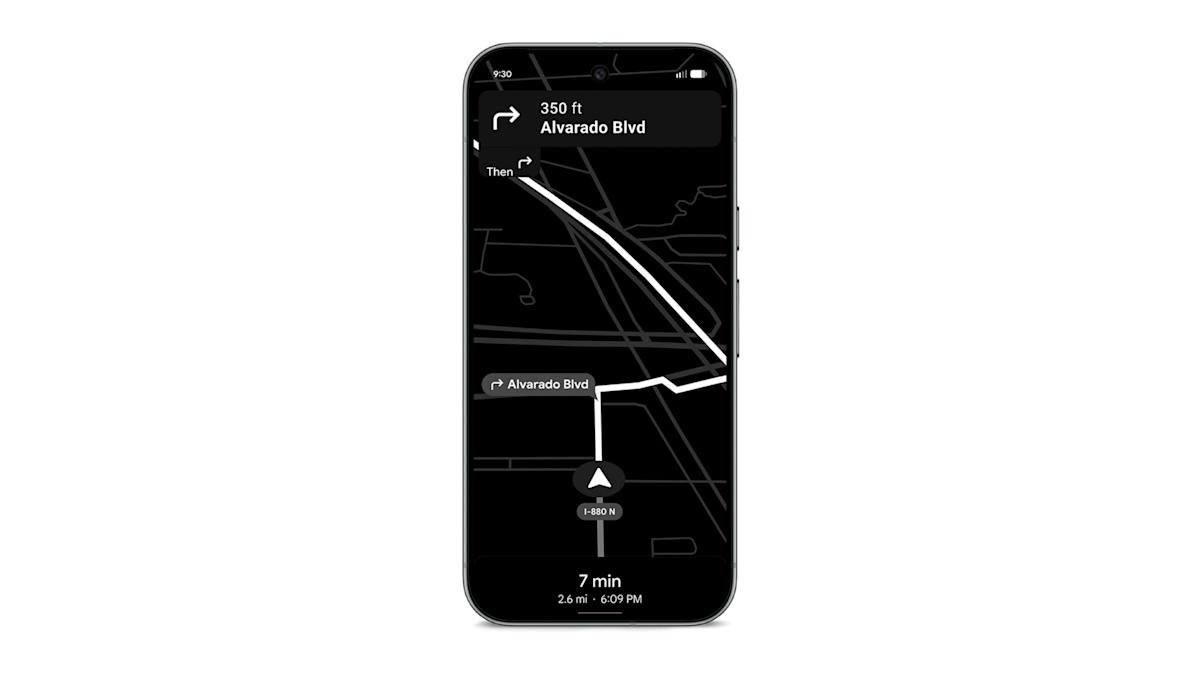
If you have a Pixel 10 phone that you use for turn-by-turn directions in lieu of a dedicated GPS device, Google has an update that may be perfect for you. Google Maps power-saving mode is now available for Pixel 10, Pixel 10 Pro, Pixel 10 Pro XL, and Pixel 10 Pro Fold. The company announced the feature earlier this month as part of its November 2025 Pixel drop.
Power-saving mode is only available in portrait orientation and works on your lock screen. If you tap the power button while using the driving navigation tool, the app will change to a simple monochrome look that retains the map layer, like this 9to5Google notes. This looks somewhat like the dark mode map of the Uber app.
You’ll only see the main details of your trip, like your next turn and expected travel time. Other elements, such as your current speed, are removed. You can still swipe down to see your notifications.
If you press the power button or tap the screen, Google Maps will return to the standard view. The app also turns off power-saving mode when you reach your destination.
Google says power-saving mode can extend your Pixel 10’s battery life by up to four hours, so it can come in handy for long drives when you don’t have an easy way to charge your phone while it’s mounted on your dashboard. The more streamlined look could perhaps also help reduce distracted driving.
Google will likely bring this feature to other devices as well, but it’s disappointing that the company is limiting it to the Pixel 10 lineup for now. Perhaps it will offer this stripped-down UI on an Android Auto version of Google Maps someday. Very
It seems that Google is enabling power-saving mode by default through an update from its side. If you are not able to use this feature, you can turn it off by going to Settings in the app, then Navigation > Driving Options And tap the toggle for Power-saving mode.
<a href